Free guide
How to make a web game with AI
Play Lai Blocks free: leverageai.io/play/lai-blocks
Ask Claude Code to plan a small game, build one playable round, then add touch controls, sound and saving. Use Codex for tickets or a second review if you want. Put the finished files on free hosting and share a link. Your friends can play in a phone or computer browser, with no app to install.
- Copyable prompts
- Touch and keyboard controls
- Free hosting explained
Published · Updated
Start buildingHow to make a web game with AI
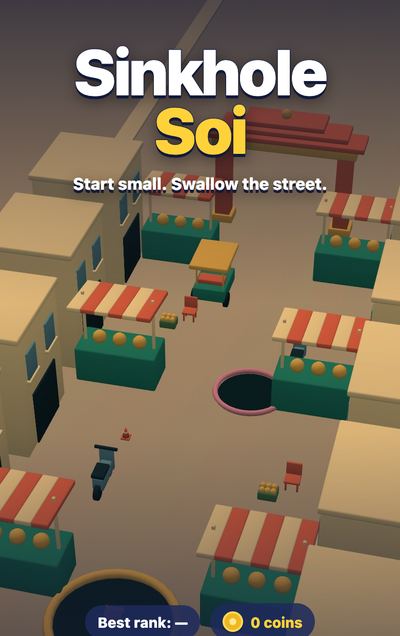
Try Lai Blocks: drag pieces onto a board and fill lines to clear them. It's one of the 12 browser games we've built with AI. For a larger example, try Sinkhole Soi, where you steer a hole through a market and swallow things to grow. Its early version needed more work on the controls and game balance. This guide is free; your AI tool's cost is separate.
What is a web game?
A web game is a web page you can play. HTML sets up the page, CSS controls its layout, and JavaScript runs the rules. You can keep a tiny game in one file or split it into a folder of plain files. The player's browser does the work.
That makes small web games a good fit for AI coding agents: tools that can write files, run the game and help fix it. You can try each change right away. You don't need an app store or a large game engine to get started.
Aim for current phone and computer browsers. A game that loads on your laptop still needs a check on a phone.
What you need
- A computer with Claude Code and access through your own plan or account.
- Codex, optionally, for building tickets or reviewing code.
- Node.js, a free tool for running the local preview, and a phone to test touch controls.
- A free Vercel or Cloudflare Pages account when you're ready to share.
Open an empty project folder in Claude Code. Ask it to use Git, which saves versions of your files, and save each working step. The prompts below are written for your own game. Change the idea while keeping the job small.
The steps
Step 1: Pick one loop you can explain in a sentence
A loop is what the player does over and over. Place a piece, clear a line, make room for the next piece. Pick one action and one clear reason to keep playing.
Help me plan a small browser puzzle. Drag pieces onto a grid and fill
rows to clear them. The game ends when no piece fits. Keep it to one
screen. No accounts, shop or online multiplayer in the first version.
A good idea fits in that short prompt. If you need to explain five currencies or a story world, cut it down. A puzzle, a dodge game or a simple collector gives you enough to learn from.
Lai Blocks keeps you busy with just placing pieces and clearing lines. Get that first move right before adding a shop or extra modes.
Step 2: Write a one-page plan and small tickets
Get the idea onto a page before the agent starts building. A ticket is one small job with a clear finish. You should be able to try its result without reading the code.
Write a one-page plan and small tickets in order. Each ticket needs a
visible result and a way to check it. Start with a playable round.
Keep the rules, controls and drawing in separate files.
Read the plan. It should tell you how play starts, how points work and how the round ends. A useful first ticket says "place a piece and clear a row". "Build the game" is too big.
Sinkhole Soi grew through separate tickets for rules, touch play, art and sound. Claude Code wrote the plan; Codex built the tickets. You can use Claude Code for all of them, too.
Step 3: Build a playable version with simple shapes
Use squares and circles first. You need to find out whether the rules work before spending time on the art.
Build the first playable ticket with plain shapes. Include a score,
a clear ending and Play again. Tell me how to start the local preview
and which browser link to open. Stop after this ticket so I can play.
Play until you lose, then start again. Try a move that should fail. A rejected move should leave your score and the board unchanged. Ask for the preview command if the agent gives you files without a way to run them. Open its preview link instead of double-clicking the HTML file. Ask the agent how to open that preview on your phone over the same Wi-Fi network.
Drop a piece outside the grid in Lai Blocks and it goes back to the shelf. Try an invalid move in your game and check that nothing disappears or scores points.
Step 4: Make controls work on phone and computer
Lai Blocks lifts each piece above your finger so you can see where it will land. Keep the thing you need to see away from your thumb.
Choose controls for the action. A puzzle can use finger and mouse drags. A moving character can use a touch stick plus arrow keys or WASD. Give players a short hint on the start screen.
Add touch and computer controls for this game. Keep the thing I'm
moving visible above my finger. For movement, support arrow keys and
WASD as well as touch. Stop movement on release and pause on tab change.
You should be able to play without fighting the page: no sideways scroll, hidden buttons or movement stuck after you lift your finger. Keep pause and restart easy to reach.
Step 5: Give it one consistent look
Our first Lai Blocks tiles had an X-shaped mark that looked like "wrong". We changed it to a flower inside a diamond. Decoration can tell a player something you didn't mean.
Pick a small set of colours and one style. Simple 2D art is enough. For 3D, the agent can write scripts for Blender, a free modelling tool, then export small models for the browser.
Give this game a warm wooden-board style with bright tiles. Show me
one sample screen first. Keep the rules unchanged. Use simple 2D art,
or make small original 3D models with Blender scripts. No paid assets.
Approve one screen before the agent changes all the art. Check that pieces stand out from the board and that the empty spaces are easy to count. Large downloads and heavy shadows can wait.
Step 6: Add sound, then decide on music
A tap or a chime can make a move feel complete. The browser can make short effects in code with Web Audio, its built-in sound tools. Music is optional.
Add quiet sounds for picking up, placing and clearing a piece. Make
them in code with Web Audio. Start sound after the first tap. Add mute
and save that choice. Pause sound when the game is paused or hidden.
Mute the game and clear a line. You should still see what disappeared and how many points you earned. If you want music, use a loop you've made or one with a clear free licence, and keep its credit. Ask the agent to show you the licence link and any credit you need to include.
Lai Blocks makes its taps and clear notes in code. Its shipped music is separate and isn't a free asset for your game. Being able to hear a track online doesn't give you the right to copy it.
Step 7: Save progress and let the game work offline
Saving and offline play are two jobs. Local storage keeps a score or unfinished round in that browser. A service worker saves the game files so the browser can open them without a connection after an online visit.
Save the best score, settings and current round in local storage.
Keep playing if storage fails. Add a service worker for offline play
after the first visit. Refresh cached files when the game changes.
In your computer's local preview, make a move, reload and continue. Let the files finish saving, turn off the connection and reopen the game. On a phone, use the HTTPS link you'll publish in Step 9 for this offline check. Service workers need HTTPS; the localhost exception applies only on the device running the preview. After an update, check that the new version loads too.
Lai Blocks changes the cache version with the game files so an update can replace the saved set. Saves stay on that browser and device; clearing browser data can remove them.
Step 8: Test like a player on a real phone
Sinkhole Soi's early computer rivals found food too quickly. Constant camera zoom also made movement feel slower. We tuned the rivals and zoom, but a bot finishing a round wouldn't have told us how either felt to a beginner.
Ask someone to play without explaining the controls. Watch where they hesitate. Then try it on your phone with the screen upright and sideways, the sound off and a slow connection.
Check this game at small phone sizes and on computer. Test touch, keys,
restart, save and offline play. Look for slow moments and unfair starts.
Give me a short phone checklist. Fix one problem at a time.
Check that you can read the score and reach the buttons, even with the browser's address bar showing. A new player should get a chance to learn before losing. Our browser phone checks used emulation. Use it to catch layout bugs, then test on a physical phone for touch and speed.
Report what happened: "My finger covers the piece" is useful. "Make it better" gives the agent little to fix.
Step 9: Put it online free and share a link
A single-player game can use static hosting: a service that sends the browser your files. Pick a name and ask the agent to prepare just the finished game folder.
Prepare this game for free static hosting on Cloudflare Pages or
Vercel. Use relative file paths and include every game asset. Tell me
which folder to upload and how to check the public link on two devices.
For a plain-file game, Cloudflare Pages Direct Upload lets you drag a folder into its dashboard. Under Workers & Pages, choose Create application and the Pages drag-and-drop option. Name the project, upload the game folder with index.html at its top, then choose Deploy site. The dashboard upload allows up to about a thousand files.
Vercel can import your own Git repository instead. Ask the agent for the output-folder settings for your project. Both hosts give you a free web address and HTTPS. Open that address on a computer and phone, play a round, reload and try again before sharing it.
Sinkhole Soi ships a whole folder of plain files. Upload the whole game folder too. The HTML page alone won't bring its models or music with it.
What does free hosting cover?
These are the hosts' published allowances, read 19 November 2026. They cover sending game files; your AI tool has separate costs.
| Host | Free plan covers | Watch for |
|---|---|---|
| Vercel Hobby, $0 USD/month | 100 GB of data transfer and a million CDN requests each month | Personal, non-commercial projects; usage limits can pause service |
| Cloudflare Pages, $0 USD/month | Unlimited static requests and bandwidth; 500 builds a month | Up to 20,000 files per site and 25 MiB per file; dashboard uploads have a lower file count |
See Vercel pricing, its Hobby allowances and use rules. Cloudflare lists its plans on Workers & Pages pricing, with static-request pricing and Pages limits.
A small game doesn't need server functions or a database. Adding live multiplayer changes the hosting job. Keep that for a later version.
If something looks off
If the game works locally but opens blank online, ask the agent to check missing files and paths first. If an old version sticks around, check the service worker update. If the game starts slowly, shrink the art and load music after the first screen.
For a confusing move, give the agent a screenshot and one sentence about what you expected. Keep a working version saved before it changes the controls.
Credits
Node.js and three.js, the optional 3D library, use the MIT licence; Git uses GPL version 2. Blender uses GPL version 2 or later, which covers the tool, not the models you make. Keep library notices and any asset credits with your game. Claude Code is proprietary; the Codex CLI uses Apache 2.0. Model access follows each provider's terms.
For online multiplayer, use the free io game guide; for a bigger 3D project, the kart kit is $39.
Questions people ask
Can I make a browser game without knowing how to code?
Yes. A coding agent can write the files and help fix bugs. You still choose the idea, play each version and explain what feels wrong. Start with one small game you can finish and restart.
Is making a web game with AI free?
This guide is free. The game can use free tools and start on free hosting, but access to Claude Code or Codex has its own plan and usage limits. Players do not need an AI account to play.
Do I need both Claude Code and Codex?
No. You can use Claude Code for the whole job. We used Claude Code to plan Sinkhole Soi and Codex to build its tickets. A second tool can also review a change.
Will my game work on a phone and offline?
It can, if you add touch controls and test on a phone. Offline play needs the browser to save the game files after an online visit. Scores saved in that browser do not move between devices.
Does a web game need a server?
A small single-player game only needs hosting to send its files to the browser. The game then runs on the player's device. Live multiplayer needs a service to connect players and share the round.