Free guide
How to make an io game with AI
Play Sinkhole Soi free: leverageai.io/play/sinkhole-soi
Make a small browser game first, then give it live rooms on Cloudflare. Use Claude Code to plan the work and Codex to build it, or use Claude Code for both. Players open a link, join the same room and play together.
- Copyable prompts
- Claude Code and Codex
- Free Cloudflare hosting limits explained
Published · Updated
Start buildingHow to make an io game with AI
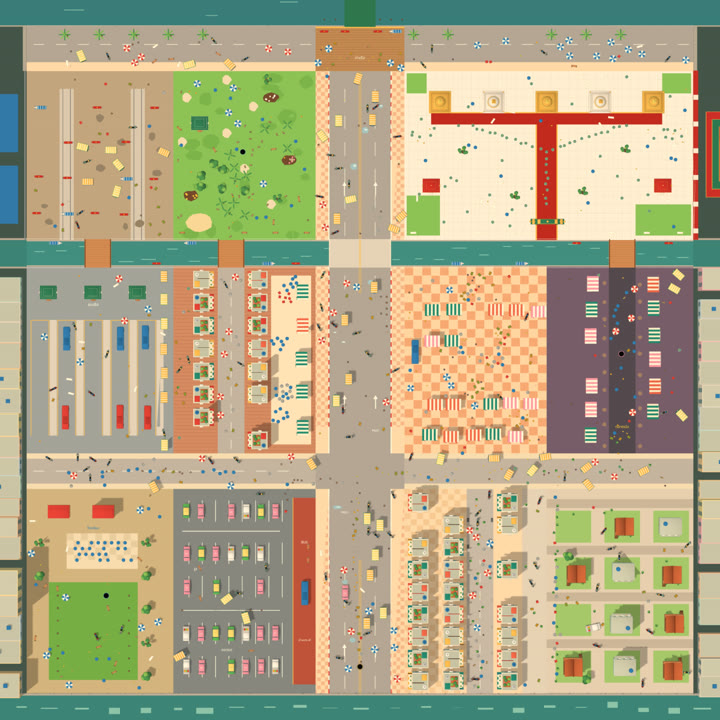
Our example is Sinkhole Soi, a hole game in a Bangkok neighbourhood. You swallow small things, grow, then eat bigger things. The first game took about half a day from plan to finished menus. Online play and the changes below came later. This guide is free; your AI tool can cost money. Hosting can start on Cloudflare's free plan.
What makes it an io game?
For this guide, an io game means strangers can join a room and play live in their browsers. Computer rivals help fill quiet rooms, but you still need a server to connect people.
A Cloudflare Worker is code that runs on Cloudflare when someone connects. A Durable Object gives each room its own place to keep the shared game state. That means everyone sees the same food disappear and the same winner. You don't rent a whole machine just to wait for players.
What you need
- Claude Code, with access through your Claude plan or account.
- Codex, if you want a second tool to build tickets or review changes. Claude Code alone is enough.
- Node.js, which runs the local tools. Use a current supported release.
- A free Cloudflare account, a computer and a browser. Use a phone too if you want touch controls.
Open an empty project folder in your coding tool. Ask it to set up Git and save each working step as a commit, so you can go back if a change breaks the game. The prompts below are for your own game; Sinkhole Soi shows what to watch for.
The steps
Step 1: Pick a loop you can explain in one sentence
Choose one control and keep the rounds short. Give players one way to grow. A loop is the action they repeat: steer, eat, grow, repeat. A flat map with circles is enough to start.
Plan a small browser hole game. Drag to steer, eat things smaller than
your hole, and grow. Rounds last about two minutes. Start with simple
shapes and three computer rivals. Leave online play for later.
You should be able to say what wins a round without explaining a menu. Here, the biggest hole wins. Put small food near the start so a new player can do something right away.
Sinkhole Soi's first version had computer rivals only. Don't call yours multiplayer until two people can join the same round.
Step 2: Ask for a plan and small tickets
Have the tool write the plan before it changes files. A ticket is one small job with a clear finish, such as making the hole move or showing the result screen.
Write a short plan and ordered tickets. Each ticket needs a visible
result and a way to check it. Separate game rules, drawing and controls.
Build one ticket at a time, starting with a playable round.
Read the plan. Cut extra shops, skins and accounts until the first round works. If you use two tools, let Claude Code plan and give Codex one ticket at a time. Ask it to report what changed and how to try it.
We built Sinkhole Soi from those small tickets, then added online play later. A ticket called "finish the game" would have hidden all that extra work.
Step 3: Make single-player fun first
Play against computer players, often called bots. They let you check the whole round without waiting for friends. Add a practice button that removes them, too.
Build the offline round first. Keep the game rules separate from the
screen drawing so a server can use them later. Add computer rivals,
practice with no rivals, and a clear result screen. Tell me how to play.
Create the project files and give me the install and local preview
commands. Wait while I play before starting the next ticket.
Try a full round. Check that moving feels clear, small objects vanish when eaten, growth unlocks bigger food and Play again works. Then do nothing for a round. The game should still reach its end.
Our first bots spotted food too far away and grabbed it too quickly. We reduced their sight and speed so beginners had a chance to eat. Check with a slow player before you make the rivals harder.
Step 4: Give each room one server referee
Now add the network. The browser is the client: it draws the game and sends your input. The server decides movement, growth and scores. A WebSocket is the open connection that carries messages both ways.
Add a Cloudflare Worker with one SQLite-backed Durable Object per room.
Run our shared game rules there. Clients send movement input only.
The server decides what gets eaten and sends snapshots to everyone.
Add a local way to try two browser windows before deployment.
A snapshot is a recent picture of the game state, sent as data. The browser draws smooth motion between updates. Ask the tool to make your own controls feel quick while still accepting the server's result.
Open two windows and join the same room. Eat a chair in one. It should disappear in both, and the server should decide who gets the points.
For Sinkhole Soi, the server runs the same game rules as offline play. Keep yours shared too. Two copies of a growth rule are two places for a later change to go wrong.
Step 5: Add quick match and private codes
Quick match finds an open public room. A private room gives you a code to send to friends. Keep private rooms out of the public room list.
Add Quick match, Create private room and Join with code. Cap a room at
four players. Show who's waiting and let the host start. Fill public
empty seats with bots; let a private host choose how many bots to add.
Open a private room in one window and join it from another. Both should show the same people. Check a bad code, a full room and leaving before the start. Each needs a plain message or a free seat.
Sinkhole Soi lets a private host choose up to three computer players. The code keeps that game out of quick match, but anyone who has it can join. Treat it as an invitation you can pass around.
Step 6: Set limits before sharing the link
Public games get broken connections and bad input. Tell the tool what the server must refuse, then ask it to check those cases.
Limit room creation, connections and messages. Reject huge or invalid
input. Close connections that never finish joining. Expire empty rooms.
Allow four people on one Wi-Fi to play. Check this locally before launch.
Try sending requests too fast, then have friends join normally. The first should be blocked; the second should work. Set an allowed list of game websites too, while keeping server checks on every message.
Our connection cap blocked a fourth player on the same Wi-Fi. We fixed it by counting unfinished joins separately from players already in the room. A household's network address can't tell you which friend is joining.
Step 7: Tell old pages when to reload
A protocol is the agreement about what messages mean. Change its version when the client and server need new rules to understand each other. A map change can require this too if both sides build the map.
Add a shared protocol version. If an old page connects, show
"Reload to update" and stop retrying. Test an old client against the new
server. Refresh cached game files when we publish changes.
Keep an old tab open while you try an update. It should either keep working under supported rules or ask you to reload. It should never sit at Connecting forever.
We saw the reload message during Sinkhole Soi updates when the new server was live before the new game page. Plan those releases together so players can get the matching page when they reload.
Step 8: Tune the feel with a few numbers
Play a whole round, keeping a note of your size as time passes. Check steering again when you're big. Change one setting, play another round, then compare.
Measure growth at the start, halfway through and near the end of several
rounds. Check camera zoom and movement at small and large sizes. Slow
growth if food runs out early. Zoom at size milestones. Retest with a
casual player, a strong player and someone who does nothing.
In Sinkhole Soi: an early test grew from a tiny hole to about seven metres in twenty seconds. The street emptied in under forty. On the later map, a strong test player reached about three metres after a minute and five after two.
The camera also pulled back after every bite, making motion look slower. We changed it to zoom at size levels and used a joystick that stops on release. Your check is simple: can a beginner keep moving and find the next thing to eat?
Step 9: Put your game online
Use your own Cloudflare project and game name. Ask the tool to prepare the files and explain the commands before you run them.
Prepare my game for Cloudflare's free plan. Use SQLite-backed room
objects and free static hosting for the game page. Give me the local
checks and deployment commands. Set the client to my room service and
allow my game website. Include a check from two separate devices.
Cloudflare's free command-line tool is Wrangler. In your room-server folder, sign in and publish with these commands:
npx wrangler login
npx wrangler deploy
Publish the browser files too. You can use Workers Static Assets for those. Open the public game link on two devices, join one private room and finish a round together. Also try leaving and returning.
We had to publish Sinkhole Soi's browser files as well as its room server. Check the link your friends will open: it needs the online menu and a working connection to a room.
What free hosting covers
Prices and allowances below are from Cloudflare, read 18 November 2026. They apply across your account.
| Service | Free allowance | Paid plan |
|---|---|---|
| Workers | 100,000 requests a day; 10 ms of CPU work per call | Starts at $5 USD a month; includes 10 million requests and 30 million CPU milliseconds a month |
| Durable Objects | 100,000 requests and 13,000 GB-seconds of active time a day; SQLite storage only | Includes 1 million requests and 400,000 GB-seconds a month |
Workers overage costs $0.30 per million requests and $0.02 per million CPU milliseconds. Static asset requests are free and unlimited. See Workers pricing.
Durable Objects overage costs $0.15 per million requests and $12.50 per million GB-seconds. A GB-second measures memory multiplied by time. Incoming WebSocket messages count at twenty messages per request; outgoing messages are free. SQLite includes 5 GB of stored data in total, plus 5 million rows read and 100,000 rows written each day. Exceeding a free limit makes that type of operation fail. See Durable Objects pricing.
Rooms are cheap when they close after play. An active game loop keeps a room awake, so requests alone won't tell you how many matches fit. Idle connections can use WebSocket hibernation, which lets a room sleep while keeping connections open. Watch active time in the dashboard as well as requests.
If something looks off
These faults came up in Sinkhole Soi's reviews:
- Rooms look full with nobody playing: close connections that never send their joining message, and remove stale room listings.
- A fourth friend can't join on the same Wi-Fi: check connection limits for shared network addresses. Limit unfinished joins separately from seated players.
- Everyone freezes after a server restart: send fresh room state and let clients accept the new update stream. Ours ignored updates when their numbering started over.
- An old tab says Reload to update: reload it. If a fresh tab says it too, check that the game page and server use the same protocol version.
- The map empties early or bots always win: measure growth over a round, then adjust food gain, bot sight or speed. Check camera zoom too if a large player feels slow.
How we checked the example
The Sinkhole Soi build records include local rounds with two and four clients, live two-client rounds and browser checks of private rooms. Reviews caught the connection and restart faults above before release. Play the example on Leverage AI or BopTaro, then try your own game on the devices your friends use.
Credits
The free tools use these licences: Node.js and three.js, MIT; Git, GPL version 2; Wrangler, MIT or Apache 2.0. Keep the library notices with your game. Sinkhole Soi's own code and art aren't included here.
For a full online-racing project, the kart kit is $39.
Questions people ask
Can I make an io game if I have never coded?
You can ask an AI coding tool to write it, but expect to play each change and report what breaks. Start with one control and computer players. Add online rooms once that small game works.
Do I need to buy a .io domain?
No. An io game is a style of browser game. You can share it on a free hosting address and use a domain later.
Can Cloudflare host multiplayer rooms for free?
Yes, within its free allowances for Workers and SQLite-backed Durable Objects. Requests, active room time and storage have limits. The Workers Paid plan starts at $5 USD per month, with usage charges above its included amounts. Prices checked 18 November 2026.
Do I need both Claude Code and Codex?
No. We used Claude Code to plan and Codex to build the first game; Claude Code also handled later changes. You can use Claude Code for both jobs. Your AI tool's plan or usage cost is separate from hosting.