Free guide
Claude Code frontend design: how to stop the AI look
To stop the AI look in Claude Code, do two things before you ask for a page. Install Anthropic's free frontend-design skill. Then write a short DESIGN.md file that names one direction: a feeling, two fonts and a few colours. After that, check every change in a browser and on a phone, and swap the filler for your real words.
- Same page, built 3 ways
- One free skill, one short file
- Under 3 minutes per build
Published · Updated
Start buildingClaude Code frontend design: how to stop the AI look
We tested this. We asked Claude Code for the same small website three times, in three empty folders. The request was the kind of thing a person really types:
Make a one-page website for a small Bangkok coffee roaster that sells beans online. One HTML file, no outside images.
The first try was the plain request. The second added the frontend-design skill. The third added the skill and a six-line DESIGN.md. Each build took Claude about two and a half minutes, and the three pages came out very different.
What the "AI look" is
You have seen it. A purple-to-blue gradient behind a big centred headline. Three cards in a row, each with an emoji icon. The same clean sans-serif font on every site. Anthropic's own write-up on the problem names it plainly: "Inter fonts, purple gradients on white backgrounds."
It happens because the model leans toward the patterns it has seen most often. Anthropic calls this distributional convergence. Ask for "a website" with no details and you get something close to the average of the web.
Our plain run showed the look has moved on. Claude didn't use purple, emoji or a centred hero. It made a warm cream page with an old-style serif font and a brick-red accent. That's a newer default, and the frontend-design skill lists it by name as a common tell. The page also had a lot of template habits:
- a phrase of the headline in red italics ("roasted down the soi")
- a tiny all-caps label above every heading
- a scrolling strip of slogans with little star marks between them
- a row of three big numbers ("1,400m avg. farm altitude")
- steps numbered 01 to 04, and a grid of product cards
None of these is wrong on its own. Together they look like a template, and people notice. Developer Adrian Krebs counted traits like these on 500 sites posted to Hacker News (GIGAZINE's report, April 2026): 28% used gradients, and 20% had a grid of matching icon cards.
What you need
- Claude Code, on a paid Claude plan or a Claude Console account that bills by use.
- A web browser, and a phone for the final check.
- An empty folder for your project.
- Optional: Playwright, a free browser tool (Apache 2.0). With it, Claude can open your page in a hidden browser and screenshot it. If it isn't installed, ask Claude to install it, or just open the page yourself.
The skill is free under the Apache 2.0 licence. The fonts in our test came free from Google Fonts under the Open Font License.
The steps
Step 1: See the default look
Open Claude Code in an empty folder and type your request as you normally would, with no design words. You want a "before" picture.
Make a one-page website for my [business]. It sells [what you sell]. One HTML file.
Double-click the index.html file Claude makes, and it opens in your browser. Look for the habits listed above. That's your starting point.
In our test, Claude named the shop Soi Nine Roasters and built a lot: a cart, a subscription form, an FAQ and a big footer. It never looked at its own page. It said there was "no browser here" and asked us to check it.
Step 2: Install the frontend-design skill
A skill is a short instruction file that Claude Code loads when the task calls for it. Anthropic's frontend-design skill tells Claude to act like a design lead. It should pick fonts on purpose, ground the look in the subject, avoid a list of known defaults, and check its work.
Start Claude Code and type:
/plugin install frontend-design@claude-plugins-official
A panel opens. Pick a scope: "Install for you (user scope)" means every project on this computer. Then it installs. From your normal terminal, claude plugin install frontend-design@claude-plugins-official does the same. We checked both commands in the Claude Code docs on 21 November 2026.
If you only want the skill in one project, copy its SKILL.md from Anthropic's plugin repo into .claude/skills/frontend-design/ inside your folder. We did it this way so the skill stayed out of our plain test.
Then send the same request as in Step 1. Start a fresh session in a new empty folder (with the skill) if you want a fair before-and-after; otherwise Claude may just edit your first page. In our test, Claude named the shop Mok (หมอก, "mist") and built the top of the page around a line map of the northern hills, with the three farms marked on it. The lines draw themselves in when the page loads. It chose two Thai typefaces, Chonburi and Bai Jamjuree, and a palette of misty sage, forest green and coffee-cherry red. It listed the beans like a price board instead of cards. The all-caps labels, gradients and emoji were all gone.
It also opened its own page in a hidden browser, took screenshots and fixed five small problems before it finished. One was a closed cart drawer that cast a shadow on the edge of the screen. The skill tells Claude to check its work this way. Playwright was already on our computer, so Claude could use it; the plain run had the same tool and never tried.
Two habits stayed: a two-column top section with the picture on the right, and three steps in a row. Also, Claude chose the direction, not us. For your own business, you'll want to choose it yourself.
Step 3: Give one direction in DESIGN.md
Make a file called DESIGN.md in your folder. Keep it short: one feeling, two fonts, two or three colours, and a few layout rules. Here's the one we used:
# Design direction
- Feeling: an old Bangkok shophouse coffee stall. Painted wooden shutters, enamel cups, a hand-lettered sign. Friendly and a bit worn, not luxury.
- Fonts: Bricolage Grotesque for headings, Work Sans for body text (both from Google Fonts).
- Colours: shutter green #1E5B4F, enamel white #F7F7F2, chili red #C8382A for buttons only.
- Layout: left-aligned, not centred. No row of three cards. Show the beans as a price list, like a menu board.
- No gradients, no emoji.
Then make a file called CLAUDE.md with one line in it. Claude Code reads this file at the start of every session.
Before any design work, read DESIGN.md and follow it.
Send the same request again in this folder. If your Step 1 page is still there, ask Claude to rebuild it from DESIGN.md instead.
Claude followed almost every line we wrote. A strip of green painted shutters runs under the top bar. A slightly tilted sign reads "Roasted in Talat Noi since 2014", next to a chipped enamel cup drawn in code. The beans sit on a green menu board with prices for small and large bags. Red shows up on the buttons, plus one small mark on the cup that our rule did not allow. Nothing is centred.
A real place, like "old shophouse coffee stall", gives Claude more to build on than "modern and clean". Pick something from your own world: a shop sign, a uniform, the packaging you already use.
Step 4: Show a reference
If there's a website whose look you admire, point Claude at it and ask what makes it work. Then add that to DESIGN.md.
I like the look of [site address]. Describe its fonts, colours and spacing in a few lines, then add them to DESIGN.md as our direction.
We used a described feeling instead of a website, because we wanted a look that fits a Bangkok stall. If you'd rather copy a site's style closely, our guide to copying a website's style shows how Claude measures a page and saves its colours and fonts to a file.
Step 5: Ask for one change at a time
Ask for one thing, look at it in the browser, then ask for the next. If you ask for six things at once, you can't tell which one broke something.
Our third page still had small all-caps labels above each heading, even though the skill warns against them. We sent:
Remove the small all-caps labels above each heading. Change nothing else.
It took Claude 14 seconds. It removed four labels and checked that nothing else had changed. It kept the hand-lettered sign above the headline, because that's part of the shophouse look, not a label.
We added "Change nothing else" so Claude wouldn't tidy up parts we liked.
Step 6: Check it on a phone
Most people will see your site on a phone. Ask Claude to check it at phone width. It uses Playwright for this if it's installed.
Check the page at phone width (about 390 px wide) and fix anything that looks broken or cramped.
This one found real problems that looked fine on a laptop:
- The menu links vanished on phones. Only "Bag" was left.
- The form boxes used text under 16 px, which makes iPhones zoom in when you tap to type.
- The grind menu was cut off and read "Whole bea…".
- The + and − buttons in the order bag were too small to tap.
Claude fixed all of these in about a minute, for small screens only, so the laptop layout stayed the same. It warned that it had only checked one width, so look for yourself too.
For a quick look, open the page in Chrome, right-click, choose Inspect, then click the phone-and-tablet icon at the top of the panel. To see it on your real phone, ask Claude:
Start a local preview server for this folder and tell me the address to open on my phone. My phone is on the same Wi-Fi.
On a home computer, Claude starts a small server and gives you an address to type into your phone's browser. Ours ran on a rented server in a data centre, not on home Wi-Fi. Claude spotted that and offered a private route instead. It wouldn't put the page on the open internet unless we said yes. Ask Claude to stop the server when you're done.
Step 7: Swap the filler for real words and photos
Your page is now full of things Claude made up. Ours had a shop history ("a hardware shop for forty years"), farmer names, prices and a phone number. Made-up details make even a good design feel fake. Ask for a list:
List every made-up detail on this page (names, prices, addresses, numbers, claims) as a checklist in PLACEHOLDERS.md so I can swap in real ones. Do not change the page.
Claude found about 60 items. It also flagged details hidden in the code. The prices and shipping fee live in the page's script too, so changing only the words would make the cart add up wrong.
Then add real photos of your shop and product. Put them in the folder and tell Claude which picture goes where.
The three versions side by side
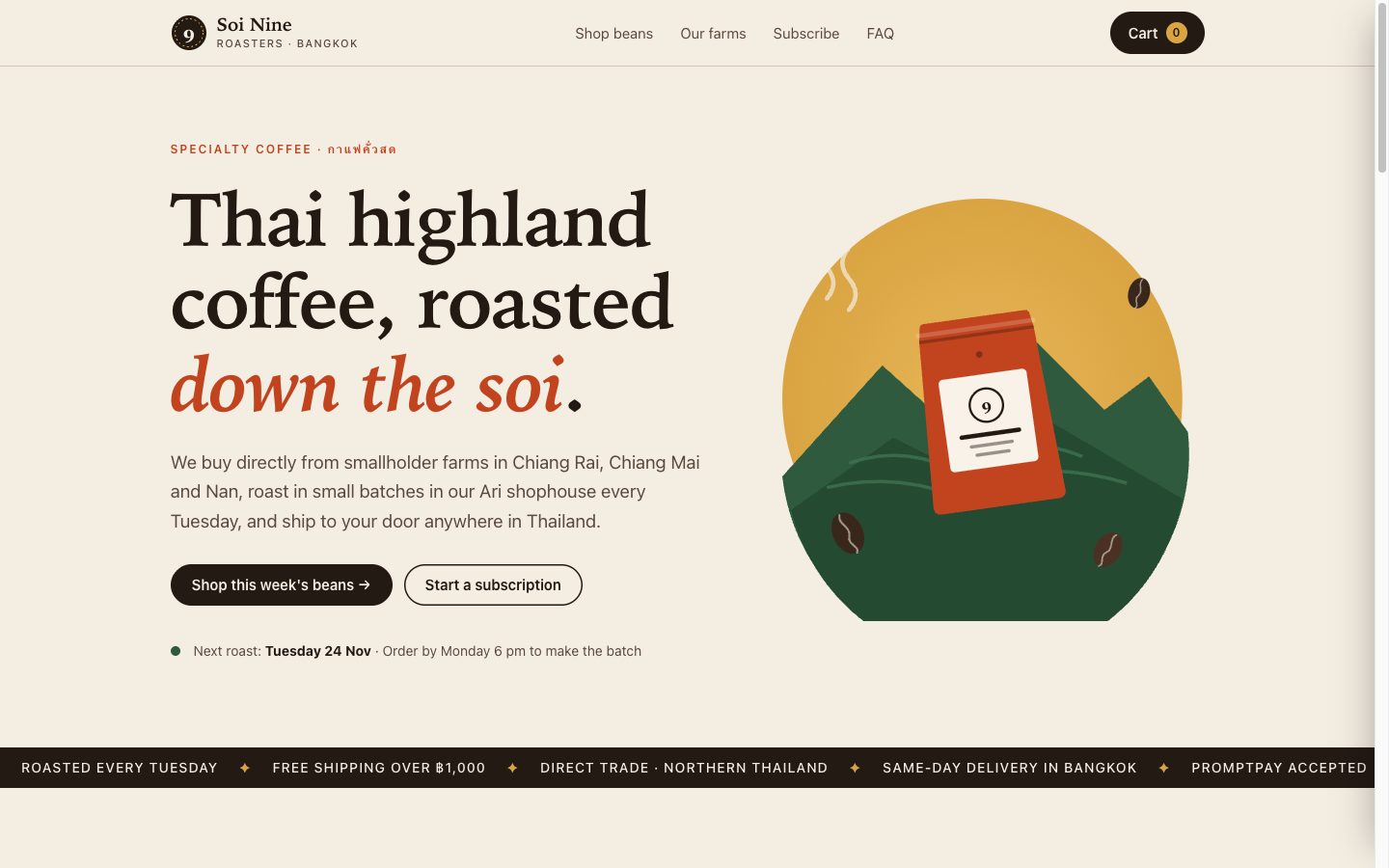
The plain request: cream paper, a serif font, and a small all-caps label over the headline.
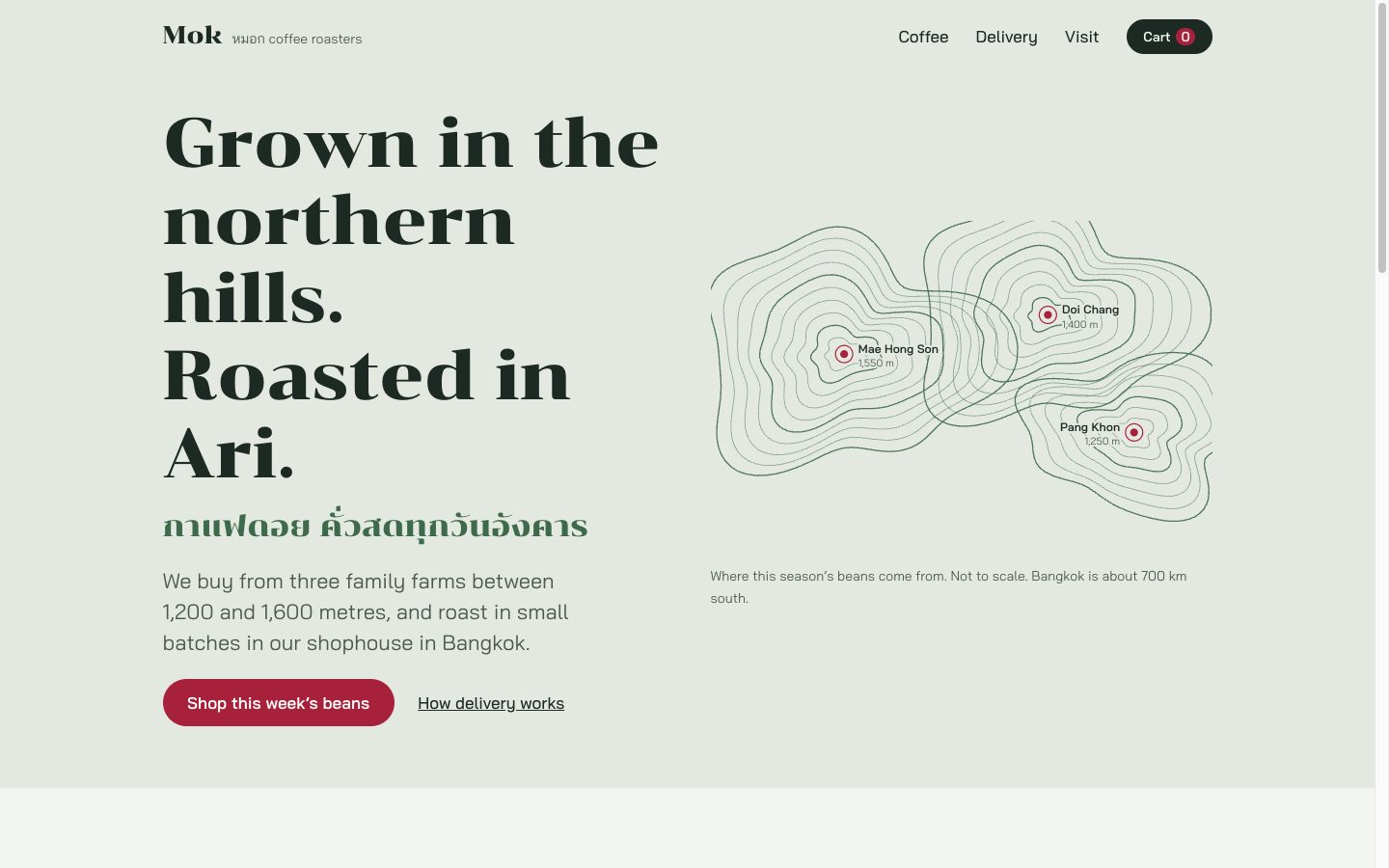
With the skill: Claude picked a direction that fits a Thai roaster.
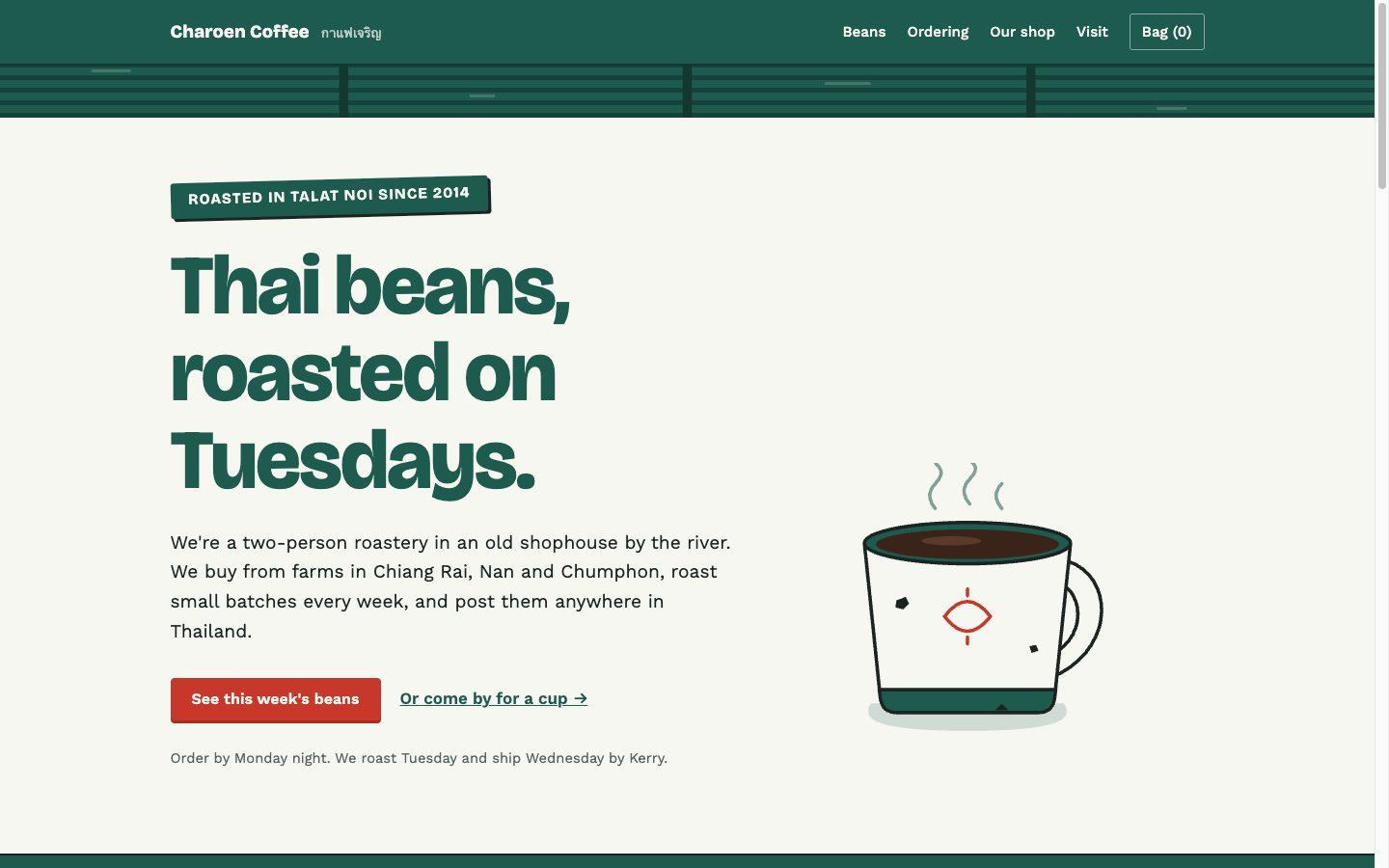
With the skill and DESIGN.md: the shophouse look we asked for.
If something looks off
Claude ignores DESIGN.md
Check that CLAUDE.md is in the same folder and names the file. Start a fresh session so it reads CLAUDE.md again.
A habit keeps coming back
Name it in DESIGN.md as a rule ("no all-caps labels"). The skill's list helps, but your own file wins.
Your font doesn't show Thai or another language
Many Google Fonts only cover Latin letters. In our third page, the Thai words fell back to the phone's own Thai font. If your site uses another language, ask Claude for a font that covers it.
A button does nothing
In all three tests, checkout and sign-up were demos that sent nothing. Claude said so every time. Connecting a real payment or form service is a separate job.
Where to go next
- Copy a website's style with Claude Code: measure a site you like and build in its look.
- Build a scroll website with Claude Code: a page where one 3D scene moves as you scroll.
- Claude Code animation styles: eight skills that turn a line of text into a short animated video.
How we tested
We ran Claude Code on 21 November 2026 with the same request in three fresh folders and sent no other prompts during those builds. Steps 5 to 7 were short follow-ups on a copy of the third page.
| Version | What was in the folder | Claude's time |
|---|---|---|
| Plain | Nothing | about 2 min 20 s |
| Skill | frontend-design skill | about 2 min 50 s |
| Skill and direction | Skill, DESIGN.md, CLAUDE.md | about 2 min 25 s |
Credits: the frontend-design skill is by Anthropic (Apache 2.0). Chonburi, Bai Jamjuree, Bricolage Grotesque and Work Sans are on Google Fonts under the Open Font License. Every shop name, price and address in the test pages is made up.
Questions people ask
Why do websites made with AI all look the same?
The model leans toward the fonts, colours and layouts it has seen most often. Anthropic calls this distributional convergence. If you don't name a direction, you get something close to the average of the web.
Do I need the frontend-design skill?
It helps. In our test the plain request gave a page full of template habits. The same request with the skill gave fonts, colours and a layout that fit the business. A short DESIGN.md with your own choices helped even more.
Is the frontend-design skill free?
Yes. It's an Apache 2.0 plugin in Anthropic's official plugin marketplace. You still need Claude Code itself, which runs on a paid Claude plan or a Claude Console account that bills by use.
Can I use the skill without installing a plugin?
Yes. Copy its SKILL.md file into .claude/skills/frontend-design/ inside your project folder. Claude Code loads it for that project only. That's how we ran our test.
What should go in DESIGN.md?
Five to eight lines: the feeling you want, two fonts, two or three colours with hex codes, and one or two layout rules. Add a line to CLAUDE.md that tells Claude to read it before any design work.