Free guide · from the Reel
Build a 3D property website that moves as you scroll.
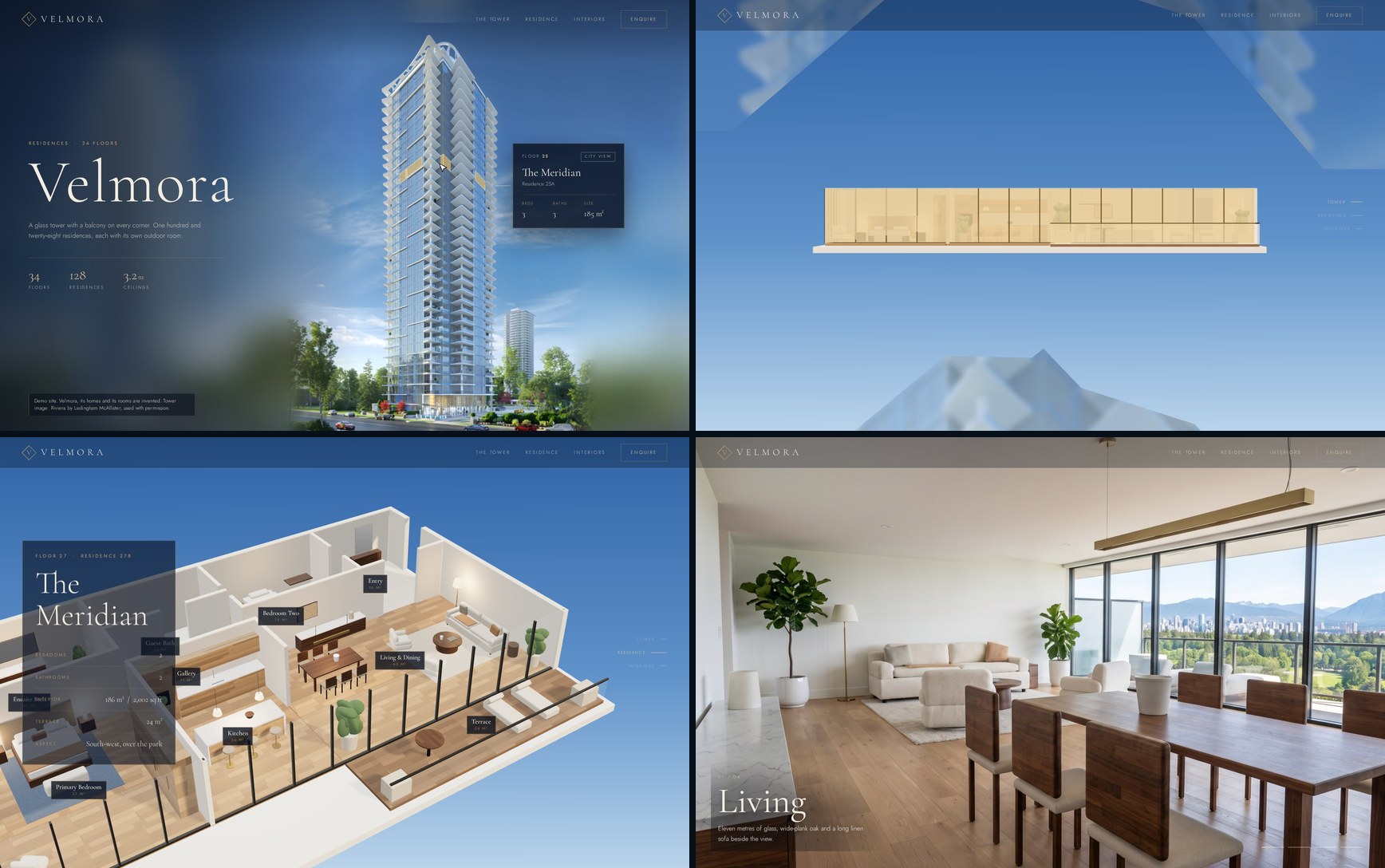
You paste a handful of prompts into Claude Code and it builds a property website that moves as you scroll. Hover a floor of the tower and it lights up in gold with a card for that home. Keep scrolling and the camera flies into a 3D apartment and lands in a photo of its living room.
- 8 steps
- Open-source libraries
- About 0.90 USD for room photos
Published · Updated
Start buildingWhat it does
We built a site for a made-up tower called Velmora. It opens on a daylight rendering of a real tower. When you hover a floor, only that floor's glass turns gold, stopping at the white balconies.
Then you scroll. The page zooms to floor 27 and pulls the tower apart there. The gold outline settles onto a 3D model of the apartment, the model tilts so you see the rooms from above, and the camera drops into the living room, which turns into a photo-like image.
What you need
- Claude Code: use the Code tab in the Claude desktop app, or the terminal. It needs a paid Claude plan that includes it (Pro and Max do) or an Anthropic API account. The steps below use the terminal. Setup guide.
- Node.js 20.19+ or 22.12+: Vite 8 needs one of these. We used Node 22.23. Download it here.
- An image of your building: a daylight rendering with sharp floor lines works best. You need the right to use it (more in Step 3).
- Optional extras: a Replicate account for the room photos in Step 6, and FFmpeg to turn the recording into a video. Claude installs Playwright for screenshots on its own.
You don't need GSAP or a 3D model of the tower.
The steps
Step 1: Make a folder and start Claude Code
Do the steps in order. Each one builds on the last.
Open a terminal and run these two lines. They make an empty project folder and start Claude Code inside it.
mkdir velmora && cd velmora
claude
Step 2: Paste the build prompt
This prompt builds the first version of the whole page. Change the name, the floor count and the colours to suit your project. Keep the list of sections, because Claude builds them in that order.
Build me a premium scroll-driven website for a new luxury apartment tower. It's made up: call it Velmora, a 34-floor glass tower on a waterfront. Use Vite with three.js and Lenis for smooth scroll. Both are MIT; don't use GSAP, I want open-source libraries only.

As you scroll:
1. Hero: the tower at dusk, built in three.js, with warm lit windows and water in front. Hovering a floor highlights it and shows a label card (floor, residence name, beds/baths, size, available). No prices.
2. Scrolling zooms the camera into the facade.
3. Then one residence becomes a 3D floor plan that lifts apart floor by floor / wall by wall, with room labels.
4. Then the rooms: living, kitchen, bedroom, bath as full-screen photos with soft transitions between them and a room name caption. Use free Pexels or Unsplash photos, download them into the project and list every photo URL and its licence in LICENSES.md.
5. A contact section with a form, and a footer that says Velmora is a fictional demo. The viewing form is a demo: on submit, send nothing and tell the visitor nothing was sent.

It should feel like a high-end real estate site: dark navy, warm gold, a serif display font. Take screenshots with Playwright at 1680x1050 while you work and fix whatever looks off.
In our run, Claude installed the libraries, added free fonts, wrote each part as its own file in src/ and took screenshots of its own work to fix problems. The floor data (collections, beds, baths, sizes) ends up in src/data.js.
Step 3: Swap in a real tower and outline each floor's glass
The first tower is drawn in code, and ours looked like a game. This prompt swaps that code-built tower for a rendering of a real building, which looks far better. Put your image in the project folder and send this, with your file name in place of tower.png:
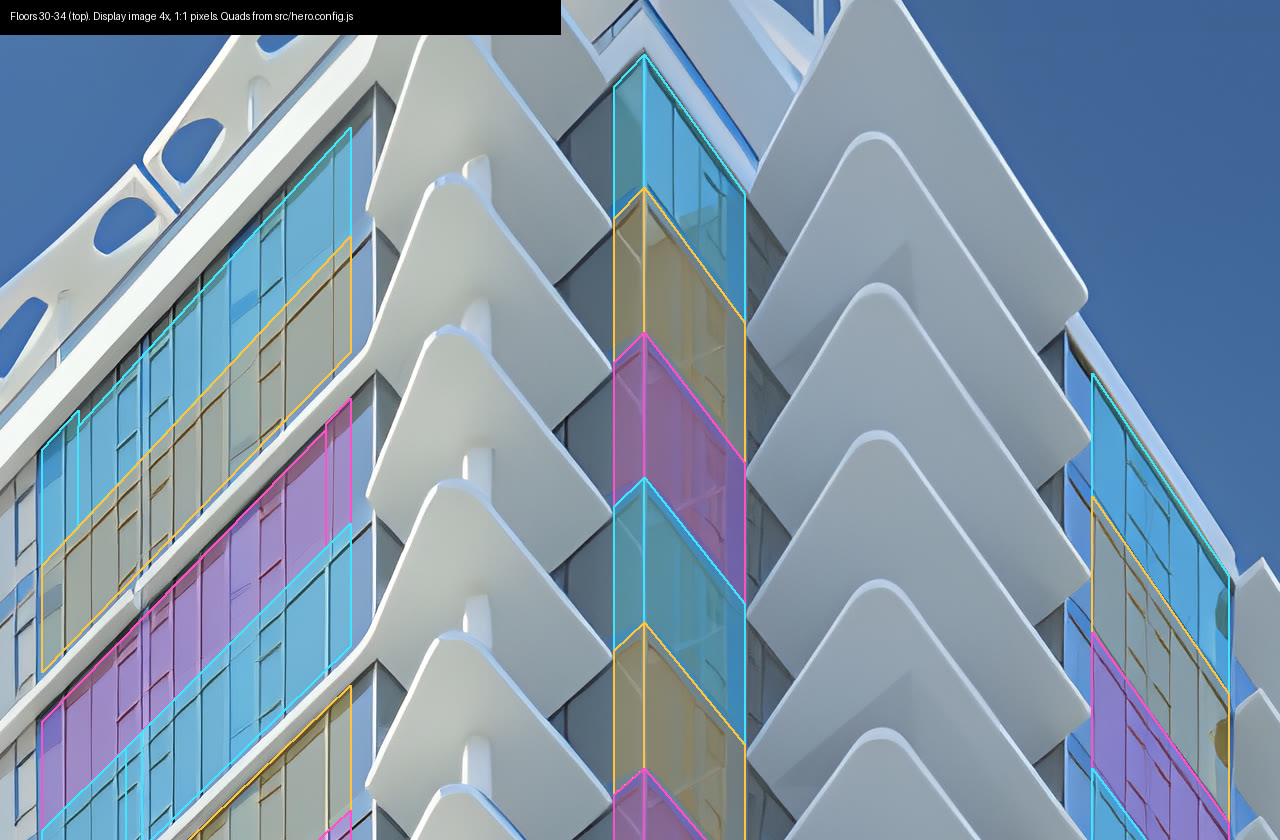
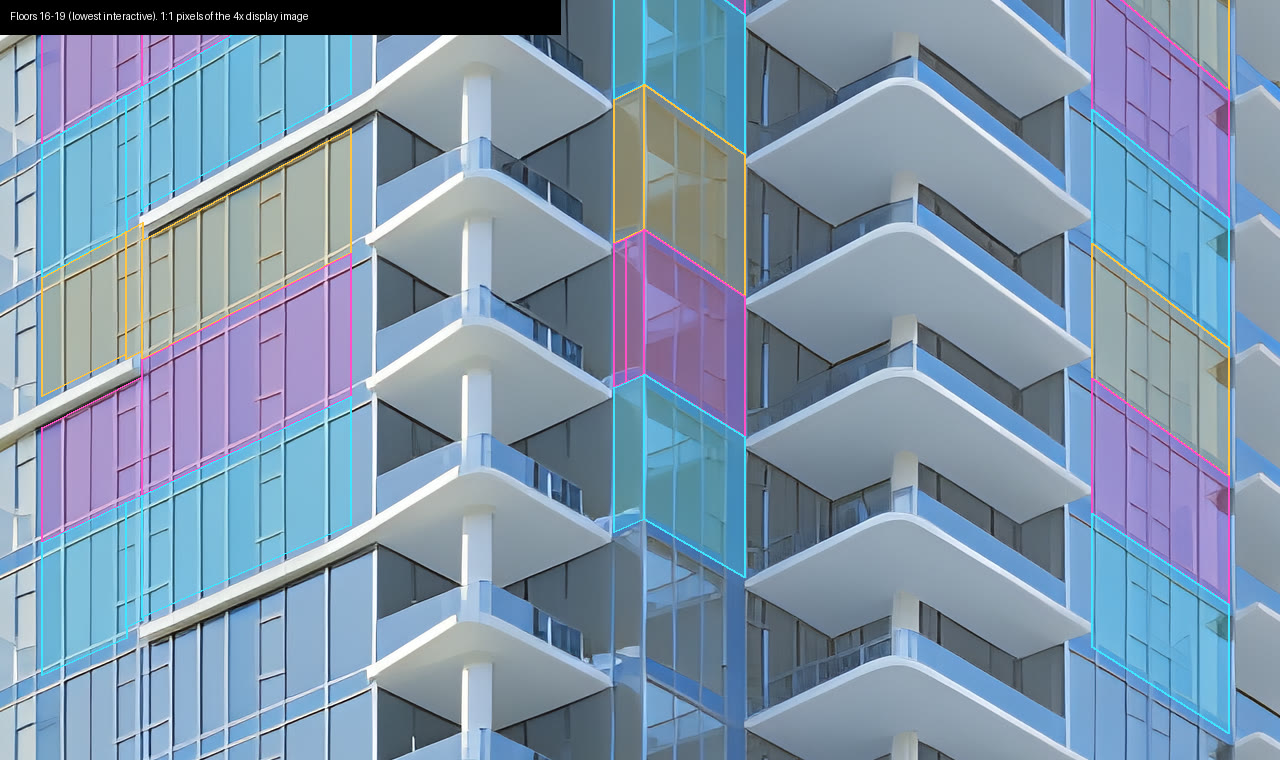
Replace the tower image with tower.png. Look closely: for each floor in the top half of the tower, draw the glass (the window layer) as an outline that leaves out the white balcony slabs and trim. Each face of glass is a near-rectangle in the image's perspective, so one floor can need several four-corner quads. Measure on the original pixels and store the quads per floor in hero.config.js. On hover, fill only those quads in gold with a thin bright edge, never the trim or the sky. Then draw every outline in alternating colours on 1:1 crops of the top, middle and lowest interactive floor, look at them, and fix any quad that spills onto trim or sky by more than one pixel. If the image is small, upscale it with a free local model for display, but keep measuring on the original pixels.
Claude measures the glass by colour, traces the floor lines and checks its own outlines on close-up crops. On our tower it upscaled the image with the free Real-ESRGAN model, which took about 17 minutes on a server with no GPU, and ended up with 106 outline pieces for floors 16 to 34.
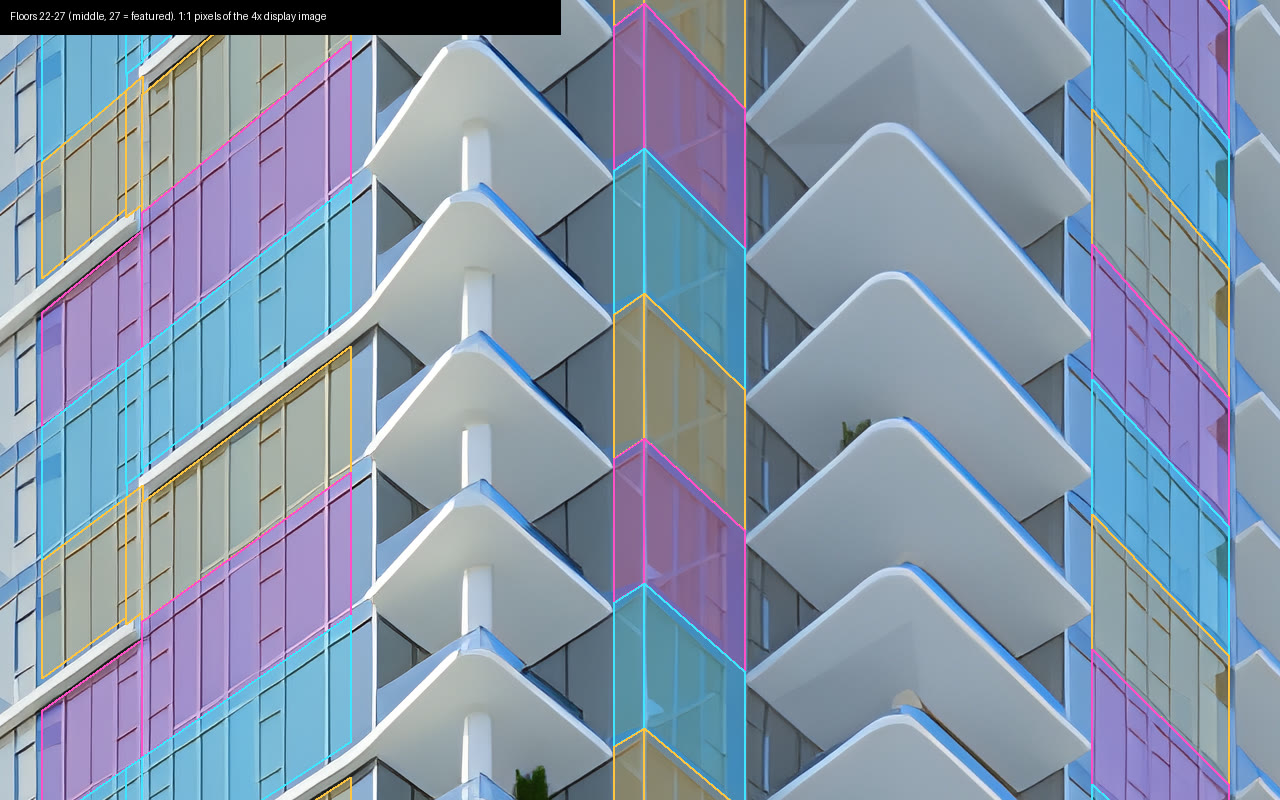
The same check on the top floors and the lowest interactive floors.
Tip: use an image you have the right to use, and say next to it that the homes are invented. We used Riviera by Ledingham McAllister with the builder's permission, and a small line beside the tower says so: "Demo site. Velmora, its homes and its rooms are invented. Tower image: Riviera by Ledingham McAllister, used with permission."
Step 4: Make the whole page one camera move
Without this step the page cuts between stages. This prompt turns the tower, the 3D apartment and the rooms into one smooth move.
The stages should be one continuous camera move, not cuts. Scroll zooms in and stops with the featured floor centred. Then split the image along that floor's slab lines: the floors above slide up and the floors below slide down, with a little blur and fade. As they move apart, fade out the floor's own strip of the image (its balcony tips are not part of the 3D floor), and fade out the 3D model's ceiling where it is, without lifting it, so the floor is open before the camera moves. Meanwhile morph the floor's gold outline into one rectangle that sits exactly on the 3D model's glass wall (project the wall's corners to the screen every frame, so it follows the camera), then fade the outline out as the 3D model takes over at the same place on screen. The model then tilts to an isometric view. Keep the model on screen while the residence card shows, then fly the camera down to eye level in the living room. Once the camera is below the ceiling, fade the ceiling and its downlights back in quickly, finishing before the living-room image starts to cross-fade in from that exact camera pose. Between rooms, dip to black for about a quarter of a second. Room images full-frame and bright, with only a small gradient under the room label. No navy fades and no cut to another building.
In our build, all the stages share one tall section driven by a single scroll value. The timing sits in a small table in src/main.js, with a start and an end for each stage.
Tip: to change the pacing, ask Claude to change the numbers in that table.
Step 5: Furnish the apartment and render the rooms
Stock photos from different homes won't match your floor plan. Instead, Claude furnishes the 3D apartment and takes a picture of each room from it.
Furnish the three.js apartment so each room has clear, real-looking furniture: a sofa, a dining table, a kitchen island, a bed, a bath. Use physically based materials, an environment light, soft shadows and warm lamps. Add a script that renders the living room, kitchen, bedroom and bath at 1920x1080 and saves the camera pose of each to poses.json. Use those renders as the room images, loaded from a config file, and make sure the living-room pose is the one the scroll dives to.
Ours came with a linen sofa, a walnut dining table, an oak kitchen with a marble island, a bed, a tub and a double vanity. Each render took 20 to 40 seconds. They were clean, but they still looked like 3D renders, which is what Step 6 fixes.
Step 6: Turn the renders into photos (optional)
Send each render through Google's Nano Banana Pro on Replicate with this prompt. You can upload the render on the model's page, or ask Claude Code to write a short script that calls Replicate's API with your REPLICATE_API_TOKEN. We used the render as the input image, aspect_ratio 16:9, resolution 2K and PNG output.
Turn this 3D render into a real architectural interior photograph of a high-floor apartment in a new Vancouver-area tower. Keep the exact same camera position, lens, framing and perspective. Keep every wall, window mullion, ceiling edge and piece of furniture in exactly the same place, size and shape, so the photo lines up with the render pixel for pixel. Do not add, remove or move anything. Make the materials real: the back wall behind the sofa and floor lamp is a solid painted white wall with no windows, exactly as in the render; the only glass is the wall of windows on the right. Materials: wide-plank natural oak floor with fine grain, a cream boucle sofa and two boucle armchairs, a solid walnut dining table with upholstered walnut chairs, a brushed-brass linear pendant, white marble sideboard top, a real fiddle-leaf fig in a ceramic pot, a wool rug. Through the floor-to-ceiling glass, a clear daytime view over green parkland to the distant city and North Shore mountains. Soft natural daylight, gentle shadows, true-to-life colour, shot on a full-frame camera with a 24 mm lens, like a developer's show-suite photo. No people, no text, no watermark.
That's the living-room version. For each other room, keep the opening (keep everything in place) and replace every detail that belongs to the living room: which walls are solid and where the glass is, the furniture and materials, and the view. Describe what that room's render actually shows, or the model may add windows or move things to match the words. Each image took about 26 seconds and cost 0.15 USD.
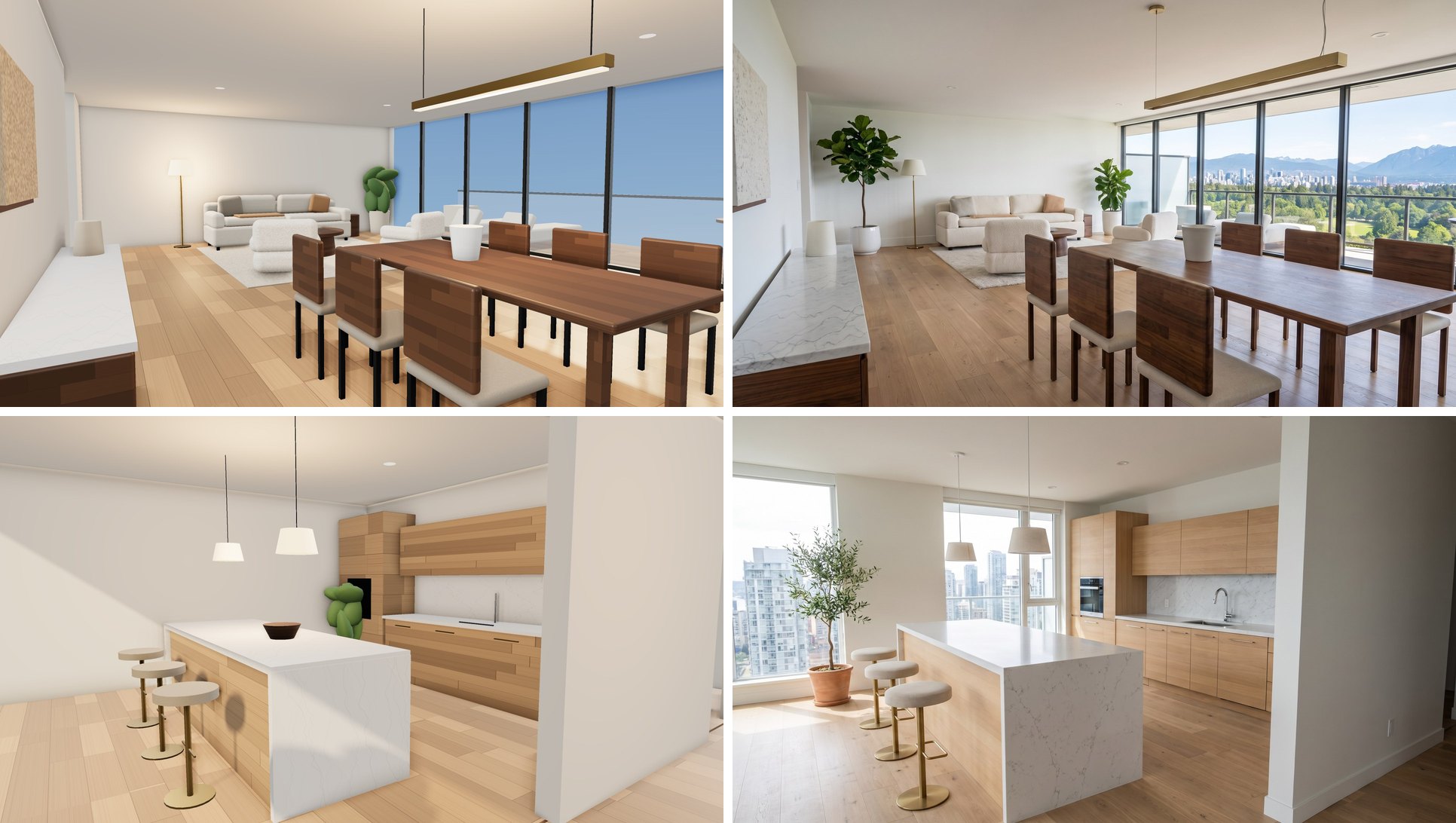
Resize the photos to 1920x1080 without cropping. The living room has to line up with the 3D view it fades in from, and a crop would make it jump.
Save each returned photo into your project. Tell Claude where you saved the living-room, kitchen, bedroom and bathroom files. Ask it to update the room-image configuration to use those files while keeping the saved camera poses. Rebuild, open the preview and check that all four new images appear. At the living-room transition, check the 3D view and the photo at the same camera position before accepting the fade.
I saved the four room photos as [living-room file], [kitchen file], [bedroom file] and [bathroom file]. Find the file that sets the room images, point it at these photos, and keep the camera poses in poses.json as they are.
Here is our page halfway through that fade:
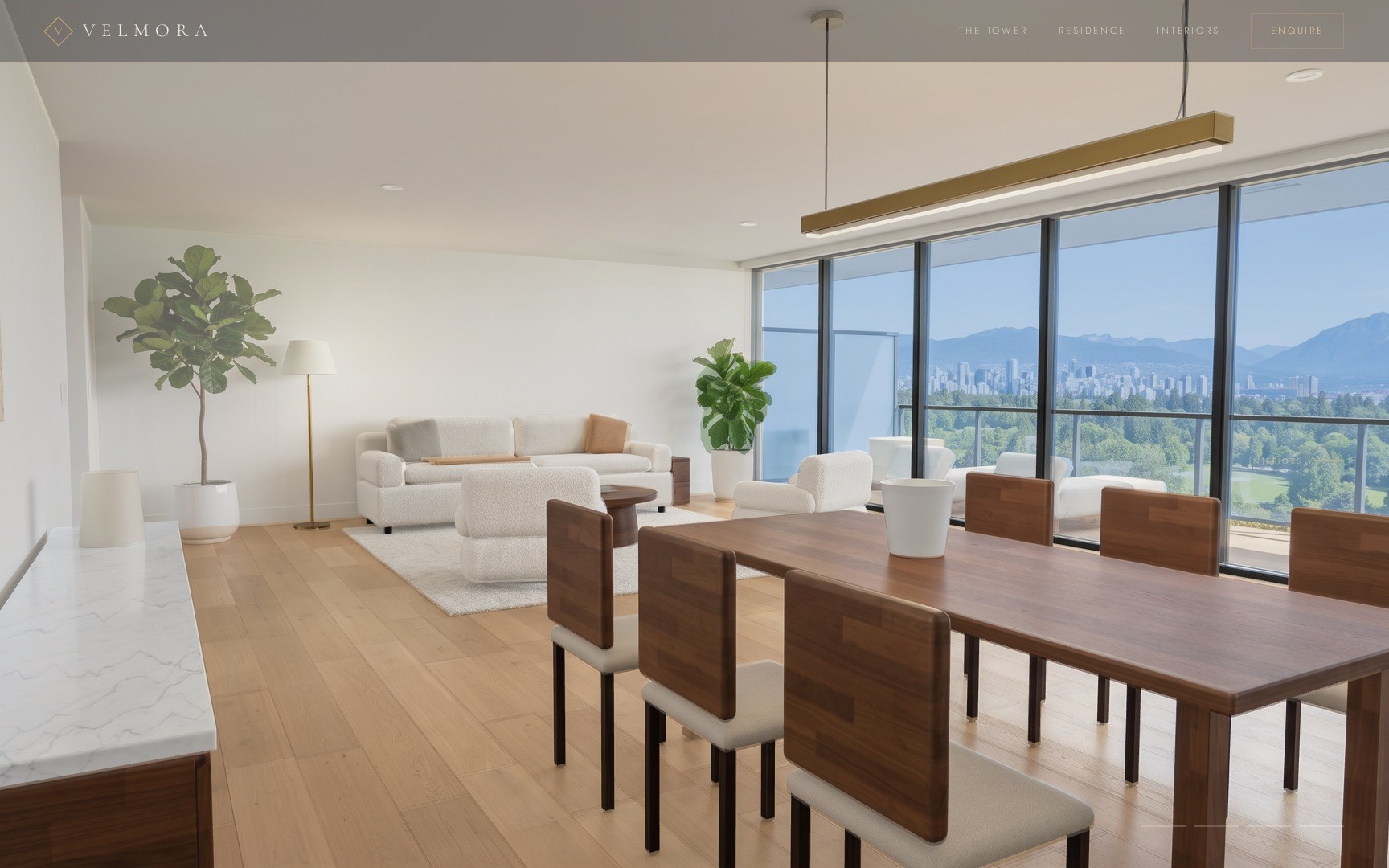
Tip: the model still adds things. Our kitchen gained windows the apartment doesn't have, and the living room gained a second fig tree. If a room changes too much, run it again with a sentence that names the part to keep.
Step 7: Build it and check it
Open a second terminal in the velmora folder (or exit Claude Code first). Run these two lines, open the address it prints and scroll the whole page once.
npm run build
npx vite preview
Ours opened at http://127.0.0.1:5184/, because Claude had set that port in vite.config.js. The finished dist/ folder was 5.8 MB, most of it the tower image.
Then check it as a phone visitor would. Open the preview on a phone, or first use a phone-sized browser preview. Try selecting a floor by tapping it, read the residence card, scroll through every room and submit the demo form. If tapping a floor does nothing, ask Claude to add tap selection and a clear way to dismiss the card. The form must still say nothing was sent.
On a phone there is no hover. Let visitors tap a floor to select it and show its residence card, and add a clear way to close the card. Keep the form's message that nothing was sent.
Tip: to open the preview on a phone on the same Wi-Fi, run npx vite preview --host and open the network address it prints.
Step 8: Put it online for free
The dist/ folder is plain files, so any free static host works. If your site will live in a subfolder (a GitHub Pages project site, for example), build it this way, or the page stays blank:
npx vite build --base=./
Image paths written in your JavaScript also need to drop the leading slash (photos/riviera-hero.jpg, not /photos/...), because Vite doesn't rewrite them. Ask Claude to check both before you upload.
Tip: ask Claude to put base: './' in vite.config.js so a plain npm run build does the same.
Then pick a host:
- Netlify Drop: drag the
distfolder onto the page. - Cloudflare Pages: connect a Git repo, or upload
distdirectly. - GitHub Pages: put the contents of
dist(not the folder itself) at the root of a branch such asgh-pages, then open the repo's Settings > Pages and choose that branch as the source.
We didn't upload ours, but we did test the subfolder setting. More on why in Vite's docs.
Optional: record a smooth scroll video
A live screen recording of the 3D part can stutter, especially on a slow machine. This prompt gets you a recorder that renders the page one frame at a time:
Write scripts/record.mjs. Usage: node scripts/record.mjs <url> <outDir>, with the length in seconds from a DUR environment variable. Open the site in Playwright at 1728x1080, take over requestAnimationFrame and performance.now so the page only moves when we step it, scroll through the stage and into the contact section on a smooth curve and hold the contact section for the last 2 seconds, move a visible cursor over the tower floors for the first 2 seconds, and save one JPEG per frame at 60 fps as f00000.jpg, f00001.jpg and so on.
Then serve the build, record the frames and join them into a video with FFmpeg:
npx vite preview --port 5184 --strictPort &
DUR=16.7 node scripts/record.mjs http://127.0.0.1:5184/ frames
ffmpeg -framerate 60 -i frames/f%05d.jpg -c:v libx264 -crf 18 -preset slow -pix_fmt yuv420p -movflags +faststart velmora-scroll.mp4
Ask for changes in normal words
Stay in the same chat and ask the way you'd ask a person:
Make the zoom into the tower slower and hold longer on the 3D apartment.
Change the colours to deep green and cream, and keep the gold hover.
Use GSAP for the scroll timeline instead of plain JavaScript.
Make the residence card bigger and easier to read on a phone.
If something looks off
The gold spills onto the balconies or the sky
The outlines in src/hero.config.js are measured in the original image's pixels, so cropping or resizing the image afterwards throws them off. Ask: "Draw every floor's quads in alternating colours on 1:1 crops of the top, middle and lowest floor and fix any quad that covers white trim or sky." On our tower the misses were where a slab edge thickens near a corner and where the roof meets the top floor.
The 3D part is black in Claude's screenshots
This happened on our server, which has no graphics card. Tell Claude to launch headless Chromium with --use-angle=swiftshader --enable-unsafe-swiftshader --ignore-gpu-blocklist. On a normal laptop you probably won't need it.
The shadows look hard-edged
In three.js 0.187 the WebGL renderer no longer has PCFSoftShadowMap. It logs a note that it's using PCFShadowMap instead, and in our build that drew hard-edged shadows. Ask Claude to set PCFShadowMap itself and give the light a shadow.radius (we used 5) to soften the edges.
The ceiling pops in instead of fading
three.js locks in a material's transparent setting the first time it draws it. Ask Claude to leave transparent: true on anything that fades and change only opacity, or to set material.needsUpdate = true after flipping it. Fade the downlights with the same value.
The living room jumps when the photo fades in
The photo has to show the room from the exact camera pose in src/rooms.config.js. Check that it was resized, not cropped. Then blend it 50/50 with a screenshot of the 3D view at the end of the dive: double edges mean it's off.
The recorder times out when the tower splits
A CSS blur on the moving layers made every screenshot hang for us. Ask Claude to bake the blur into a half-size copy of the image and fade that in instead. It looks the same.
The recording freezes or breaks halfway
Playwright's built-in fake clock (page.clock.install()) froze our page, so the recorder replaces only requestAnimationFrame and performance.now. And record against npx vite preview, not npm run dev: the dev server reloads the page when a file changes, and the recorder times out.
The page is blank on GitHub Pages
Rebuild with --base=./ (Step 8). Image paths written in JavaScript need to drop the leading slash (photos/riviera-hero.jpg, not /photos/...). If grep -rn "'/photos" src/ finds anything, ask Claude to fix those paths or build them from import.meta.env.BASE_URL.
Credits and licences
- three.js 0.187.0, MIT.
- Lenis 1.3.27, MIT.
- Vite 8.3.5, MIT. Playwright 1.64.1, Apache-2.0.
- Fonts: Cormorant Garamond and Jost via Fontsource 5.3.0, SIL Open Font License 1.1.
- Upscaler: Real-ESRGAN ncnn-vulkan build, BSD-3-Clause.
- Rendering: Riviera by Ledingham McAllister (used with permission).
- Room images: AI photo pass over renders of our own three.js model, made with Nano Banana Pro (Google) on Replicate.
- GSAP was not used. Its Standard No Charge licence is free but not open source.
How we tested
We built Velmora with Claude Code and Opus 5.5 on Node 22.23. We worked on a server with no graphics card, so the 3D part ran at a few frames per second there. Six room images went through the photo step: four rooms plus two retries, one for the living-room wall and one for a bathroom that still looked like a render. When we laid the resized living-room photo over the render, an edge check found no shift, and the table, chairs, sofa and pendant sat right on top of each other. Our 1,002-frame recording took 4 minutes 29 seconds, and the finished site was 5.8 MB.
Part of dist/ | Size |
|---|---|
| Code and fonts | 1.5 MB |
| Tower image | 2.8 MB |
| Blurred copy and backdrop | 0.3 MB |
| Four room photos | 1.1 MB |
Questions people ask
Do I need to know three.js or WebGL?
No. We described each section in plain words and Claude Code wrote all the three.js, the scroll maths and the CSS. Your job is to watch the result in a browser and say what looks wrong.
Why not GSAP? Most tutorials use it.
GSAP is free, including for commercial work, under Webflow's Standard No Charge licence. That licence isn't open source and has a few limits, so we asked for Lenis (MIT) for smooth scrolling and plain JavaScript for the scroll timeline. If GSAP's licence suits you, ask Claude to use it instead.
How much does it cost?
We spent about 0.90 USD on top of our paid Claude plan: six images from Nano Banana Pro on Replicate, at 0.15 USD each at 2K, for the room photos. three.js, Lenis, Vite, Playwright, the two fonts and the Real-ESRGAN upscaler are free and open source. Skip the photo step and the rooms stay plain 3D renders at no cost. On API billing you also pay for the tokens.
Why use an image of the tower and not a 3D model?
Our first build drew the tower in three.js from boxes and shaders. It moved well but looked like a video game. A rendering has real light, glass and balcony detail, and the hover still works because each floor's glass is outlined on the image. The apartment further down is 3D.
Why make the room photos from the 3D model instead of using stock photos?
Stock photos come from different homes, so they don't match each other or the floor plan. Rendering the rooms from the same 3D apartment keeps layout and furniture in line with the plan, and the living room can fade from 3D to photo from one camera position. The image model did add a few things the plan doesn't have, such as kitchen windows, so treat the photos as the feel of the rooms, not an exact drawing.
Where can I host it for free?
The build is a folder of static files (5.8 MB for us), so Netlify, Cloudflare Pages or GitHub Pages all work. If the site will live in a subfolder, such as a GitHub Pages project site, build with --base=./ (Step 8).
Read it on your computer
Keep this guide for later.
We'll send you this page's link and the other free guides.