Free guide · from the Reel
Find businesses that need what you sell.
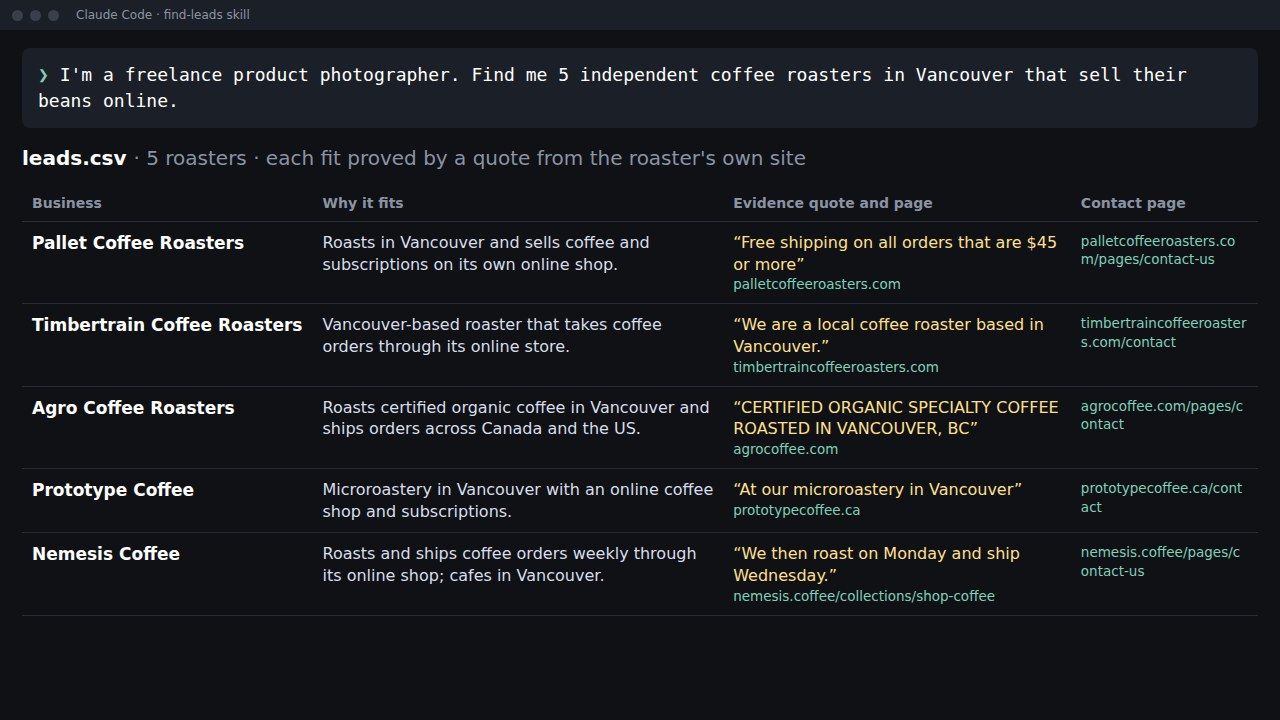
Tell Claude Code who you sell to in one sentence. You get back a short spreadsheet of real businesses that may fit. Each row has a quote from the business's own site that shows the fit (or a note on what you still need to check) and a first message you can paste. You check the rows and send the messages yourself.
- About 5 minutes for 10 leads
- 7 steps
- Free skill
Published · Updated
Start buildingWhat it does
We tried it as a product photographer looking for coffee roasters in Vancouver that sell beans online. This one sentence went in:
I'm a freelance product photographer. Find me 10 independent coffee roasters in Vancouver that sell their beans online.
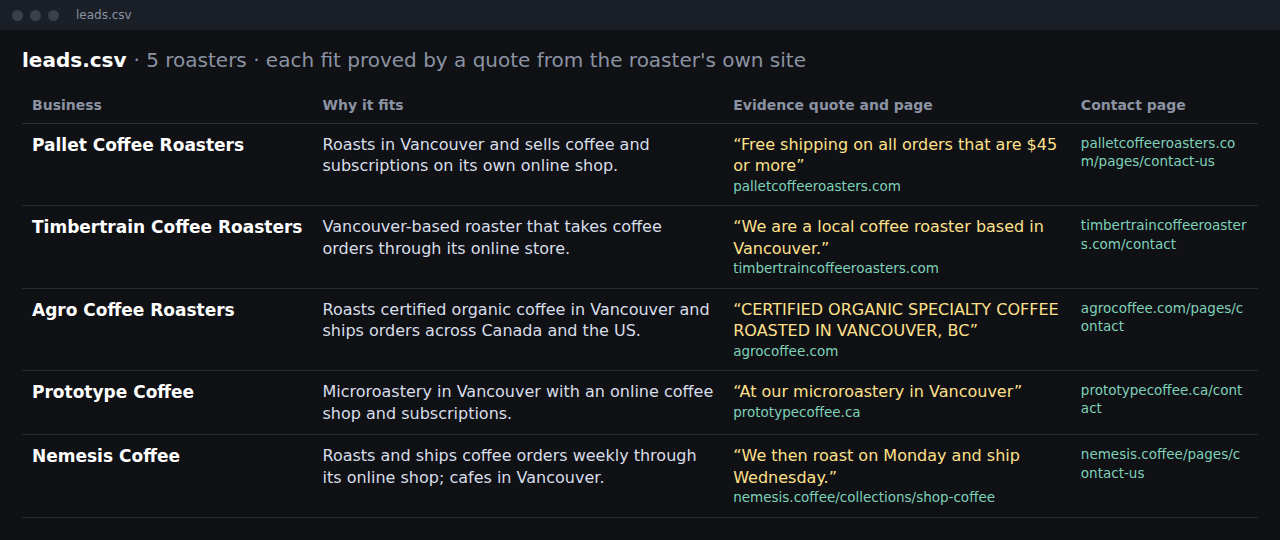
About 5 minutes later, these were the first rows that came back, each with a quote from the roaster's own site:
| Business | Why it fits | Proof from its own site |
|---|---|---|
| Pallet Coffee Roasters | Vancouver roaster with an online shop that ships | "Free shipping on all orders that are $45 or more" |
| Nemesis Coffee | Roasts its own coffee and ships online orders weekly | "We then roast on Monday and ship Wednesday." |
| Agro Coffee | Vancouver roaster shipping across Canada | "FREE SHIPPING ACROSS CANADA ON ORDERS $45+" |
Every row also has the business's contact page and a short first message that opens with that fact. You review a list instead of building one.
What you need
- Claude Code: use the Code tab in the Claude desktop app, or the terminal. We ran our tests in the terminal, and the steps below use it. Setup guide.
- A paid Claude plan or API billing: Claude Code needs one. Each run of 9 or 10 leads cost us $1.10 to $1.87 at API prices.
- One sentence about your client: what you sell, the kind of business, the place, and what makes a business a good fit.
The steps
Step 1: Make a folder
Do the steps in order. Steps 1 and 2 are one-time setup.
Open a terminal and run these two lines. They make a project folder with a place for the skill.
mkdir -p find-leads/.claude/skills/find-leads
cd find-leads
Step 2: Save the skill
A skill is a Markdown file of instructions that Claude follows. Copy the whole block below and save it as .claude/skills/find-leads/SKILL.md inside your new folder.
Open your find-leads folder in a text editor. Open .claude, then skills, then find-leads. Create a plain-text file named SKILL.md, paste the block without its outer backticks, and save. Make sure the name is SKILL.md, not SKILL.md.txt. If your file browser hides folders starting with a dot, use your editor's Open Folder command.
---
name: find-leads
description: Build a short list of candidate businesses that match the user's ideal client, each with the page that backs it up or what still needs checking, a contact page and a first message. Use when the user asks for clients, leads or prospects.
---

# Find leads

Find real businesses that may fit, check each on its own website, and write `leads.csv`.

Business facts only: no personal emails, phones, home addresses or staff names; never send anything yourself.

## 1. Read the brief

Work out the kind of business, the place, the fit rule (for example "sells beans online"), what the user sells and how many (default 10). If the offer is missing, ask one short question.

## 2. Find candidates

Run 3 to 6 plain WebSearch queries ("independent coffee roasters Vancouver"). Skip LinkedIn, social networks, logins, paid databases, and chains unless asked for. A business counts only once you've opened its live website in this session.

## 3. Check each candidate on its own site

1. Open `https://<domain>/robots.txt`. If it has `Disallow: /` for all agents or for ClaudeBot, Claude-User or Claude-SearchBot, drop the business.
2. Open the homepage and up to 2 more pages on the same site (shop, about, contact). For a `to check` business, up to 6 pages in all.
3. Find the public contact page. If there isn't one, use the homepage and say so in `notes`.
4. Give the business a status:
   - `confirmed`: a page you opened shows it fits. Copy a short exact quote (under 20 words) that shows it.
   - `to check`: the fit rule is about something the business doesn't have (no online booking, no online shop), which a quote can't show. Within that 6-page limit, first open the menu or footer links that hint at it (for booking: "book", "appointments", "schedule", "service"), and search `site:<domain> book online`. If any page shows the thing, drop the business. If not, quote a line showing it's real and in scope, and start `notes` with "No [thing] found on:" and the pages you opened.
   - If you can't show either, drop it. Never guess.

Write down only facts you read on a page in this session.

## 4. Write the first message

Under 80 words:
- Open with one fact from the quote, and say in one sentence what the user offers and why it fits that fact.
- About the user, say only what they told you: no location, past clients or portfolio unless they said so.
- End with one easy question, then: "If it's not for you, just say so and I won't follow up."
- No flattery or fake urgency. Sign off with `[your name]`.

## 5. Write `leads.csv`

Columns:

`business,website,status,why_it_fits,evidence_quote,evidence_url,contact_page,first_message,notes`

`status` is `confirmed` or `to check`; `evidence_quote` is exact words from `evidence_url`; `notes` holds anything the user should check. In the chat, show a short table (business, status, why it fits, evidence URL) and say how many candidates you checked, how many you dropped and why.
Step 3: Start Claude Code
In the same folder, start Claude Code with this line. It lets Claude search and read websites without asking you before each one.
claude --allowedTools "WebSearch WebFetch Read Write Skill"
Step 4: Ask in one sentence
Say who you are, who you want to reach and what makes them a fit. Fill in the brackets with your own details:
I'm a [what you do]. Find me [how many] [kind of business] in [city or area] that [what makes them a good fit].
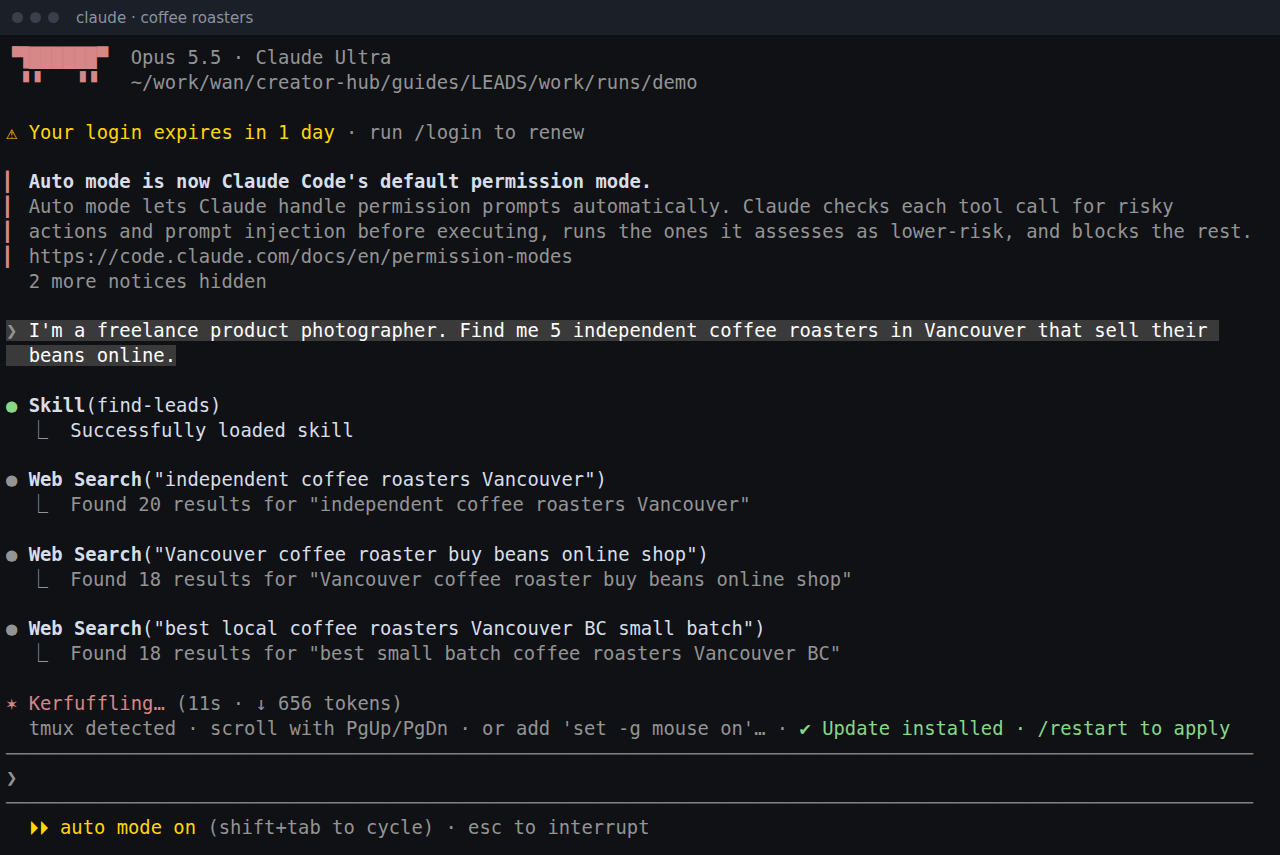
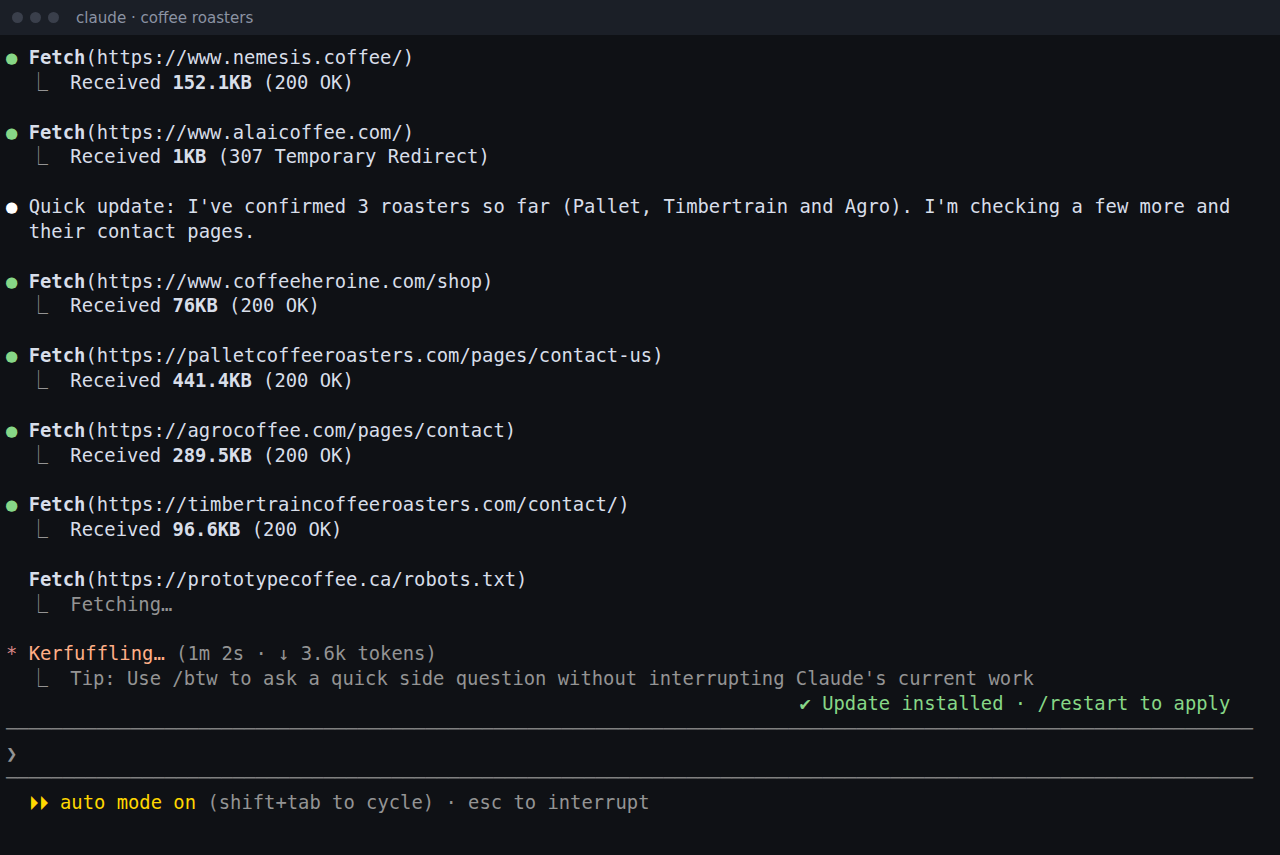
Step 5: Read what it dropped
When it's done, Claude tells you how many businesses it looked at and why it left some out. In our coffee test it checked 21 roasters and kept 9. It dropped 2 whose sites block Claude, 2 that don't roast their own beans, 4 chains and 4 with nothing on their own site to back them up. Then it said: "I stopped at 9 rather than add one I couldn't confirm."
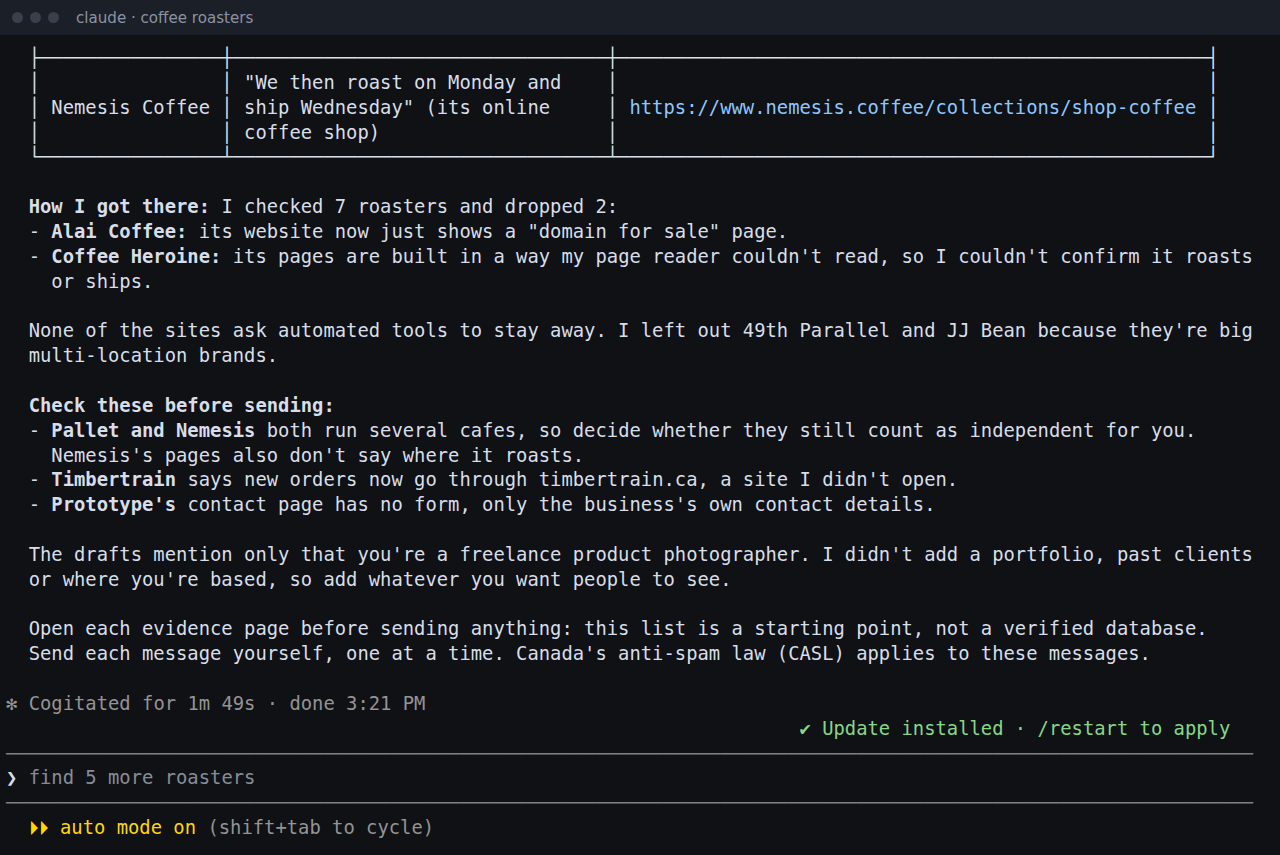
Tip: if you need more leads, widen the area or loosen the rule.
Step 6: Check each row
Open leads.csv in a spreadsheet. Start with the rows marked to check.
confirmedmeans a quote on the page shows the fit rule you gave. It doesn't prove everything else, such as the exact area: 4 of our 18 coffee leads were just outside Vancouver, and Claude said so innotes. To check the quote, openevidence_url, press Ctrl+F (Cmd+F on a Mac) and search for a few words of the quote.to checkonly appears when your rule is about something a business doesn't have (for example "no online shop yet"). Claude lists the pages it looked at innotes. Open the site yourself before you pitch, because a page reader can miss a button.
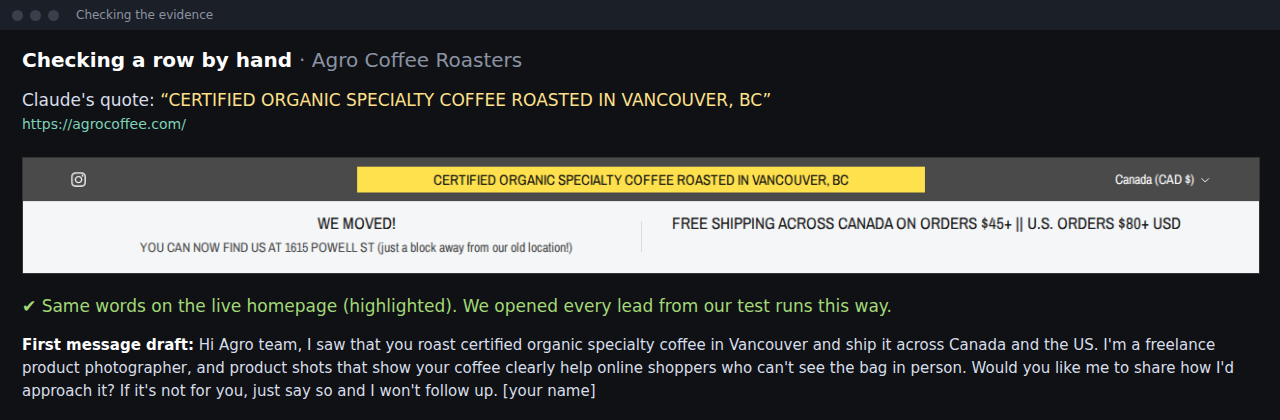
Tip: a few quotes sit in a slideshow, a collapsed FAQ or the page source, where Ctrl+F may miss them.
Step 7: Send it yourself
Read each message, add your name and paste it into the business's contact form. Here is the draft Claude wrote for Pallet Coffee Roasters, unedited:
Hi, I saw that Pallet offers free shipping on coffee orders of $45 or more. I'm a freelance product photographer, and clean, consistent bag and product shots are what customers judge an online coffee order by. Would it help if I explained how I'd approach photos for your shop? If it's not for you, just say so and I won't follow up.

[your name]
Tip: check the anti-spam rules where you and the business are before you send (US, Canada).
Ask for changes in normal words
Stay in the same chat and ask the way you'd ask a person:
Find 5 more, and include the towns just outside the city.
Make the first messages shorter and more casual.
Open the site for [business] again and check that it really sells online.
Drop the rows marked to check and show me only the confirmed ones.
If something looks off
The message says things about me I never said
The skill tells Claude to use only what you told it about yourself. Read each message anyway, and add anything true about you, like your city or past work.
It says a business lacks something it has
Claude's page reader doesn't see every button, so a rule like "no online shop yet" can let through a business that has one. Those rows say to check for this reason. Open the site and look.
A quote is slightly off
In one of our quotes, a phone number and an email went missing from the middle. Search the page for a few words of the quote and fix it in the spreadsheet before you use it in a message.
A website gives Claude instructions
Some shop sites in our tests ran on Shopify, whose robots.txt files ask AI agents to recommend a shopping skill. Claude ignored it and told us. Claude's summary can't prove what it did, so don't rely on it alone. Scroll back through the run in Claude Code and check that it didn't install anything or run a tool a website asked for. The start line in step 3 lets Claude search, read pages and write files without asking; anything else, like running a script, still needs your yes.
It asks to run a script
Claude may want to run a small Python script to write the spreadsheet. You can allow it, or say no and it writes the file another way.
How we tested
We ran the coffee search shown here twice on 31 Oct 2026 in Claude Code 2.1.314 with Opus 5.5. We also tested a harder kind of rule, something a business doesn't have: independent bike repair shops in Portland without online booking, three times. Those are the bike rows in the table. For the first four runs, a script opened all 114 cited pages and looked for each quote, and we read them too. In those four runs, no message got a fact about a business wrong.
| Search | Leads | Real businesses | Quote found on the page | Fit the ask |
|---|---|---|---|---|
| Coffee roasters, 2 runs | 18 | 18 | 18 | 14, plus 4 just outside Vancouver |
| Bike shops, 2 runs | 20 | 20 | 19 | 17 |
| Bike shops, skill on this page | 10 | 10 | not checked | 8 |
Questions people ask
Can I trust the list?
Use it as a starting point. In the four runs we checked by script, every business was real, 37 of 38 quotes were on the page Claude named, and no message got a fact about a business wrong. Do check the fit: 4 of our 18 coffee leads were just outside Vancouver, and Claude said so in its notes.
Does it use LinkedIn or a paid lead database?
No. It reads public business websites with Claude Code's built-in web search. LinkedIn's User Agreement (section 8.2) bans scraping, so the skill skips it.
Can it send the emails for me?
No. It writes drafts into the spreadsheet, and you paste each one into the business's contact form yourself.
What does it cost?
The skill is free. Claude Code needs a paid Claude plan or API billing. Claude Code's own cost report put each 9 or 10-lead run at $1.10 to $1.87 at API prices.
Read it on your computer
Keep this guide for later.
We'll send you this page's link and the other free guides.